ValhallaRoom Tips and Tricks: Short Drum Rooms

ValhallaRoom can be used to generate a room sound that works well with acoustic drums. Some recommending starting points:

  • Use the Large Room or Large Chamber Reverb Mode. These provide an earlier onset of echo density.
  • Dial in the initial “size” of the room with PREDELAY. A standard trick is to use 15 to 30 milliseconds of predelay for the ambience mikes in a “live” drum room.
  • DECAY should be set anywhere from 0.3 seconds to just over 1 second.
  • HIGH CUT can be used to tame the high frequencies of the decay. A real room is often much darker than one would think, so don’t hesitate to set this as far down as 5000 Hz. A brighter room can be set between 6 and 9 kHz.
  • The DEPTH control is used to dial in the ratio of early to late energy. A setting of 50% is a good starting point.
  • The Early Size setting can be used to add a short amount of early reflection energy to the attack when set to the 10-30 msec range. A setting of 50 to 100 msec is useful in obtaining a slight amount of “gated” sound, or for simulating the flattening of the decay envelope produced by heavy limiting/compression or tape saturation. Note that the overall decay time will be extended by the Early Size setting.
  • The Early Send control is critical in shaping the early attack of short room sounds. By setting Early Send to 0.0, the initial attack can be varied between flattened and an exponential decay, by adjusting the DEPTH control to crossfade between the Early and Late reverbs. With Early Send set closer to 1.0, the Early Size setting will dominate the decay of both the Early and Late reverbs, producing a flattening of the initial decay.
  • The Late Size should be set to 0.5 or less, to produce the highest initial echo density.
  • The Late Bass should be set to 1.0X or less. Lower values add clarity to the decay.
  • In general, a more realistic room sound is obtained by keeping the Early and Late Mod Depth set to 0.0. However, if you are wanting to emulate the super chorused “room” of the EMT250, by all means feel free to crank the Mod Depth up!

A few example presets (copy to your clipboard, and select “Paste from clipboard” in the Preset menu to hear the sound), starting with a realistic small room:

[sourcecode language=”xml”]<ValhallaRoom pluginVersion="1.0.5" presetName="SmallishDrumRoom" mix="0.300000012" predelay="0.0299999993" decay="0.00300300308" HighCut="0.530201316" earlyLateMix="0.5" lateSize="0.330000013" lateCross="1" lateModRate="0.0909090936" lateModDepth="0" RTBassMultiply="0.153333336" RTXover="0.0909090936" RTHighMultiply="0.444444478" RTHighXover="0.530201316" earlySize="0.0193193201" earlyCross="0.100000001" earlyModRate="0.0909090936" earlyModDepth="0" earlySend="0" diffusion="1" type="0"/>[/sourcecode]

The next preset generates more of a compressed/gated early attack:

[sourcecode language=”xml”]<ValhallaRoom pluginVersion="1.0.5" presetName="SmashedDrumRoom" mix="0.300000012" predelay="0.0299999993" decay="0.00300300308" HighCut="0.463087261" earlyLateMix="0.5" lateSize="0.49000001" lateCross="1" lateModRate="0.0909090936" lateModDepth="0" RTBassMultiply="0.153333336" RTXover="0.0909090936" RTHighMultiply="0.444444478" RTHighXover="0.530201316" earlySize="0.067467466" earlyCross="0.100000001" earlyModRate="0.0909090936" earlyModDepth="0" earlySend="0" diffusion="1" type="0.333333343"/>[/sourcecode]

By setting the Early Send parameter of the previous preset to 1.0, the early attack is extended, to produce a bit of a slapback echo effect.

[sourcecode language=”xml”]<ValhallaRoom pluginVersion="1.0.5" presetName="SlapbackDrumRoom" mix="0.300000012" predelay="0.0299999993" decay="0.00300300308" HighCut="0.463087261" earlyLateMix="0.5" lateSize="0.49000001" lateCross="1" lateModRate="0.0909090936" lateModDepth="0" RTBassMultiply="0.153333336" RTXover="0.0909090936" RTHighMultiply="0.444444478" RTHighXover="0.530201316" earlySize="0.067467466" earlyCross="0.100000001" earlyModRate="0.0909090936" earlyModDepth="0" earlySend="1" diffusion="1" type="0.333333343"/>[/sourcecode]

ValhallaRoom Tips and Tricks: Gated Reverbs

Generating a gated reverb sound with ValhallaRoom is easy:

  • Set the DEPTH control to 0%, so that only the Early reverb is heard.
  • Set PREDELAY to 0.0 msec, so that the gated sound is generated by the Early energy only (the PREDELAY can be set higher for gated echos).
  • Set Early Diffusion to 100%, for maximum echo density.
  • Use Early Size to dial in the desired gate length in milliseconds.
  • Adjust High Cut for desired brightness
  • Use Early Mod Rate and Early Mod Depth to add chorusing to the gated reverb sound

Here’s a preset for a 150 msec gate. Copy the entire text, including the < and > tags at the beginning and end, and use the “Paste from clipboard” option in the Presets menu to bring the preset into ValhallaRoom.

[sourcecode language=”xml”]

<ValhallaRoom pluginVersion="1.0.5" presetName="Gate150msec" mix="1" predelay="0" decay="0.0190190189" HighCut="1" earlyLateMix="0" lateSize="0.5" lateCross="1" lateModRate="0.0909090936" lateModDepth="0.5" RTBassMultiply="0.333333343" RTXover="0.0909090936" RTHighMultiply="0.444444478" RTHighXover="0.530201316" earlySize="0.14914915" earlyCross="0.119999997" earlyModRate="0.0909090936" earlyModDepth="0" earlySend="0" diffusion="1" type="0"/>
[/sourcecode]

ValhallaRoom: The Late controls

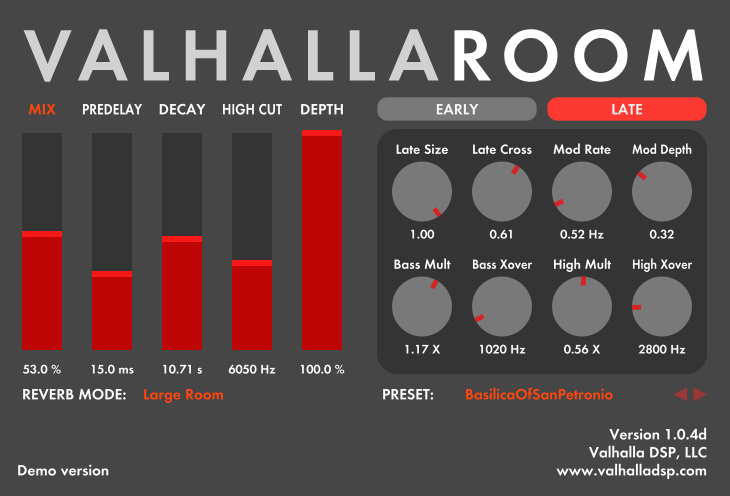
The Late reverberation controls in ValhallaRoom can be accessed by clicking the Late button under the VALHALLAROOM title at the top of the plugin. The Late button will turn red when the Late editor is active.

An overview of the Late reverb controls:

  • Late Size: adjusts the relative size of the late “room.” Larger values correspond to larger spaces, and will result in a more expansive sound. For some of the Reverb Modes, high settings of Late Size will result in audible early echos, so adjust this by ear for each reverb mode.
  • Late Cross: controls the amount of coupling between the reverberators for the left and right channels. A Late Cross setting of 0.0 corresponds to separate reverbs for the left and right channels, where a signal injected into a single channel will decay in that channel only. Increasing the Late Cross setting will cause energy to spread across the stereo image as the signal decays, at a rate determined by both the Late Cross setting and the Late Size control (with a smaller setting of Late Size corresponding to a faster spread of energy between the left and right channels). By setting Late Cross to a value less than 1.0, the input stereo image will be preserved as the sound decays away.
  • Mod Rate: controls the modulation rate of the Late reverb. This is more of an “average” rate, as there is a LOT of modulation going on in the Late reverb, with up to a few dozen LFOs, all of which are randomized and have different base frequencies. Generally speaking, rates around 0.5 Hz are useful for smoothing out any artifacts in the decay, while rates above 1 Hz are useful for adding lush chorusing artifacts.
  • Mod Depth: controls the depth of the modulation in the Late reverb. Note that this is also dependent on the Reverb Mode setting, with the Bright Room having more obvious random pitch warbles for a given Mod Depth settings than the other modes.
  • Bass Mult: adjusts the decay time for the low frequencies, relative to the mid frequency decay time set by the DECAY slider. Examples:
    • A Bass Mult setting of 0.5X, and a DECAY setting of 2 seconds, will result in a low frequency decay time of 1 second.
    • A Bass Mult setting of 2.0X, and a DECAY setting of 2.0 seconds, will result in a low frequency decay time of 4 seconds.

    From a physical perspective, Bass Mult settings >1.0X are useful for emulating halls and other large spaces, while Bass Mult settings <1.0X can be useful in emulating smaller spaces. From a perceptual perspective, Bass Mult settings greater than 1.0X add more “warmth,” while settings less than 1.0X create “clarity.”

  • Bass Xover: controls the crossover frequency, in Hertz, between the bass decay (which is controlled by Bass Mult times DECAY) and the midrange decay (which is controlled by DECAY). Generally speaking, this is most effective when set somewhere between 300 Hz and 1500 Hz, but values outside of this range are useful for special effects.
  • High Mult: adjusts the decay time for the high frequencies, relative to the mid frequency decay time set by the DECAY slider. Examples:
    • With High Mult set to 0.25X, and a DECAY setting of 2 seconds, will result in a high frequency decay time of 0.5 seconds.
    • With High Mult set to 0.5X, and a DECAY setting of 2.0 seconds, will result in a high frequency decay time of 1 second.

    From a physical perspective, high frequencies tend to be absorbed by air fairly rapidly, so setting High Mult to 0.5X or less will result in a more natural decay. From a perceptual perspective, use High Mult to control the brightness or darkness of your reverb decay to your tastes.

  • High Xover: controls the crossover frequency, in Hertz, between the the midrange decay (which is controlled by DECAY) and the bass decay (which is controlled by Bass Mult times DECAY). For normal settings, values between 3000 Hz and 8000 Hz are useful, but this is highly dependent on the High Mult factor, as well as the desired effects.

ValhallaRoom: The Early Controls

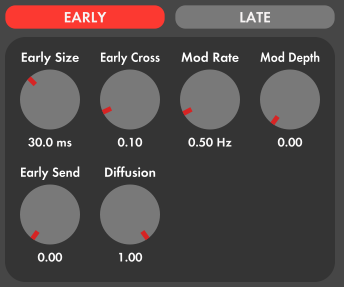
ValhallaRoom can be viewed as having two separate sections for the reverberation, Early and Late. The Early controls can be accessed by pressing the Early button in the top of the plugin (under the VALHALLA ROOM text):

The Early section can be heard in isolation by setting the DEPTH slider to 0%. Higher DEPTH settings will crossfade between the Early and Late reverberation, with a setting of 100% resulting in the output coming entirely from the Late reverberation.

A quick overview of the controls:

  • Early Size: adjusts the length of the Early energy impulse, in milliseconds. A length of 10 to 50 milliseconds is useful for simulating the early reflections found in a smaller acoustic space, or for creating a wider stereo image without a strong reverberant decay (when DEPTH is set to 0%). Early Size settings between 50 and 100 milliseconds can create the impression of a “compressed” room, where the initial attack is squashed by a limiter or tape saturation. Settings above 100 milliseconds will sound like a “gated” reverb in isolation, and can create a slower attack when the Early energy is sent to the Late reverb (see Early Send for details). Larger Size settings are useful for creating long gated reverbs.
  • Early Cross: controls the stereo cross-mixing of the Early Energy. An Early Cross setting of 0% will result in no mixing of energy between left and right channels; a signal in the left channel will not generate any early reflections in the right channel. Higher settings will mix the energy between the left and right channels, and will also increase the echo density. Generally speaking, lower settings of Early Cross are useful in preserving the spatial imaging of a mix.
  • Mod Rate: Controls the base modulation frequency of the Early chorusing, in Hertz. This is an “average” rate, as there is a fair amount of randomization used for the chorusing. Values around 0.25 to 0.5 Hz are useful for warming up the sound, while around 1 to 2 Hz is useful for adding a bit of “string ensemble” effect to the sound.
  • Mod Depth: Controls the depth of the Early chorusing. In general, you will want to keep this low when creating realistic smaller spaces, and turn it up when creating large spaces or emulating older digital reverbs.
  • Early Send: Controls how much of the Early reverberation is fed into the Late reverb. The Early reverberation has been designed to interface nicely with the Late reverberation, such that sending the Early signal into the Late reverb produces a relatively colorless enhancement of echo density. A value of 0 corresponds to no send (i.e. the Early and Late reverbs are purely in parallel) while 1.0 results in the maximum send to the Late reverb. A few suggested settings:
    • Set Early Size to 10-50 msec, and Early Send to 1.0, to create a dense Late reverb.
    • Set Early Size to 150 msec or more, and Early Send to 1.0, to create a slow onset to the Late reverberation. This is useful for simulating very large halls and cathedrals, as well as adding clarity to the input signal.
    • Set Early Size to 70-100 msec, Early Send to 0.0, the Late Size to a smaller value, and Depth to 0.5, in order to simulate a smaller space that has a somewhat compressed attack.
  • Diffusion: Controls the echo density of the Early reverb. Low settings result in a less dense Early reverb, while higher settings increase the echo density. Unlike many algorithmic reverbs, high Diffusion settings will not result in a metallic decay with vocals and drums, so feel free to keep Diffusion set at 1.0 for most purposes. Low settings of Diffusion, combined with larger Early Size settings, can be useful in creating strange multitap echo sounds.

Cave Paintings, Wabi-Sabi, and Plugins

The other night, Kristin and I saw Werner Herzog’s latest film, “Cave of Forgotten Dreams”:

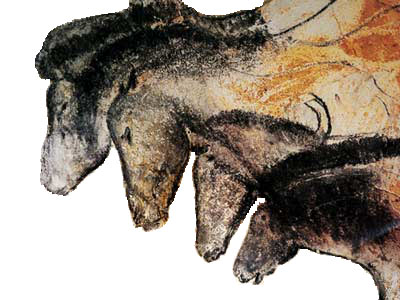
The movie was a 3D documentary about the paintings found in Chauvet Cave. These paintings are believed to date from up to 32,000 years ago, and are of an artistic standard that is stunning to this day:

The entrance to the cave is believed to have collapsed around 20,000 years ago, essentially sealing in the art until the cave was rediscovered by explorers in 1994.

After the film, we had some deep discussions about art and impermanence. Right now, my main artistic outlet is the development of plugins. And plugins (and software in general) tends to be very ephemeral. A plugin or music software program that runs on a general purpose computer will be lucky if it runs 10 years from now. Windows machines tend to be better in this respect, as an audio app that ran in Windows 98 could conceivably run today. However, the more useful audio applications from the 1990’s tended to run on the original Macintosh OS, and it is difficult to find a computer that can run these applications today. I have several friends that spent years creating work in Supercollider 2, and that work will no longer run on modern Macintoshes. Turbosynth is another “classic” Mac OS application that will no longer run.

The impermanence of digital audio software is obviously not limited to plugins and Mac/Windows apps. Most of the “canonical” computer music pieces were created for systems that no longer exist. In order to get the maximum performance out of limited hardware, the majority of the “classic” computer music languages from the 1960’s through the 1980’s were created using the assembly language of the machine they were run on, and will not function outside of that environment. For example, Music 11 only runs on a PDP-11; Music 360 only ran on an IBM360; Music Kit was designed for the NeXT cubes with built-in Motorola DSPs; the Samson box compositions only ran on the Samson box.

A few of the older computer music languages were written in Fortran (Music 4F and Music V) and still have a fighting chance of being compiled today. Unfortunately, the compositions written for these programs are also hard to get up and running – good luck finding a working punch card reader today. For that matter, many of the optical and magnetic drives from the 1990’s are no longer functional.

In some ways, the impermanence of software brings to mind the Japanese concept of Wabi-Sabi. This is the idea of finding beauty in transience, and that beauty that is “imperfect, impermanent and incomplete.” In the traditional Japanese conception of this idea, wabi-sabi can be found in rustic items such as the simple clay bowls used in the tea ceremony. The cracks and chips of such bowls, and the changing color of the glaze over time as it is chemically altered by hot water, are believed to embody the idea that “nothing lasts, nothing is finished, and nothing is perfect.”

It is tempting to explain away the short lifespan of audio software as wabi-sabi. This perspective would allow me to explain away bugs as “imperfections to reflect upon,” and would carry on the grand tradition of appropriating Eastern religious concepts into a Western philosophical framework without bothering to truly understand those Eastern concepts. However, I’m not able to make the comparison stick.

One could argue that analog musical instruments and equipment decay gracefully with age. The yellowing grillcloths of a Fender amp, the crackle on the lacquer finish of an older guitar, the small tuning instabilities of an older analog synth, the strange electronic howls of a fuzz box as its battery dies…all of these would allow the user to reflect upon the passage of time.

Software does not age gracefully. It works, and then it doesn’t. The life of software is nasty, brutish and short, and death comes quickly via a hard drive crash, or painfully via the bloat of a Windows registry. When it is gone, nothing useful is left behind, except for a box full of toxic metals.

So, how do I, as a software developer and digital artist, respond to the impermanence of software?

For starters, I keep my prices reasonable. Charging several hundred dollars for something that won’t work 20 years from now feels weird. I’ll keep things running as long as I can, but there will come a day when I am no longer alive, and these plugins won’t keep working.

I can also look into embedding my algorithms into hardware. The long term longevity of digital signal processors has yet to be seen, but I have several digital reverb boxes that are 20 to 25 years old, and are still running strong.

Finally, there is source code as a way of survival. My algorithms from my Csound days are still being integrated into open source projects today, and those algorithms are from 1999. I am not working on any open source projects presently, but it something to consider for several years down the road.

Nevertheless, the odds that any of my algorithms will survive 100 years, let alone 32,000 years, are slim at best. At Chauvet Cave, we are seeing the work of a very few artists, and we have no true way of estimating the scope of art in the ancient world, but it is probably save to assume that the vast majority of ancient art has been lost forever to the processes of decay and weather. Life is fleeting, and all turns to dust in the end, so having art that is a reflection of this truth is probably the most honest response.

ValhallaRoom updated to version 1.0.4

I’ve just released the 1.0.4 update of ValhallaRoom:

A brief overview of the updates:

  • Windows RTAS! ValhallaRoom is now available in all major formats for PC (VST32/VST64/RTAS) and OSX (AU/AU64/VST/RTAS).
  • Mix lock functionality. The red “MIX” label above the Mix slider is clickable. Clicking on the Mix label allows the user to lock/unlock the Mix value, so that a given mix level can be retained while browsing through presets.
  • The red triangles to the right of the current preset (“BasilicaOfSanPetronio” in the image above) allow the user to quickly scroll through presets.
  • I’ve created some new Cathedral presets, based on acoustic measurements of Italian cathedrals (and one German cathedral).

ValhallaRoom: Early Reflections versus Early Energy

The reverberation algorithms in ValhallaRoom are separated into 2 sections, Early and Late. This is a fairly common division of tasks in algorithmic reverbs. However, while most reverberation algorithms describe the early part of the reverberation as Early Reflections, ValhallaRoom’s early section would be better described as “Early Energy.” The important distinctions:

  • Most reverberators that feature “Early Reflections” use up to a few dozen discrete delay taps, or echos. These delays are often based upon a ray-traced model of a room, but fail to take into account the diffusion found with real acoustic surfaces, and the huge amount of complexity that is found in a real performance space. Things like furniture, seats, columns, and other performers and musical instruments, all combine to create a reflection pattern that is far more complex than what a few dozen delay taps can reproduce.
  • In order to add the complexity that is missing from the tapped delay early echo generation, some manufacturers have resorted to allpass delays in order to increase the echo density. This can work well for many signals, but can result in metallic artifacts on vocals and impulsive signals such as drums. I’ve described this phenomenon extensively in an earlier post. The “Diffusion” control in most reverberators can be seen as a way of dealing with the unpleasant side effects of allpass filters, by allowing the user to control the allpass delay coefficients to suit particular input signals.
  • ValhallaRoom doesn’t attempt to model any particular room geometry. Instead, it takes the approach that the early energy should be as dense, colorless, and spacious as possible, in order to emulate an “impossible” room. The user can dial in the duration of the early energy (using the Early Size control), to emulate smaller or larger spaces. A range of 10 to 50 milliseconds is common for smaller spaces, while larger durations are useful for emulating concert halls and cathedrals, where the initial reverberation tends to take some time to build up intensity.
  • The crossfeed of energy between spatial channels in ValhallaRoom can also be controlled with the Early Cross control, to create reverbs that have a realistic spread of energy between left and right channels, or an unnatural separation of the early energy that can be useful in preserving the initial spatial image of a stereo mix.
  • The Early section of ValhallaRoom has no allpass delays in it, which allows it to avoid the coloration caused by short allpasses. The Early Diffusion control adjusts the overall echo density, but it is mainly there for special effects – you can turn Diffusion all the way up, without getting the “ringing” sounds associated with high diffusion settings in some algorithmic reverberators.

ValhallaRoom was designed from a pyschoacoustic perspective, as opposed to a physical perspective. The goal was to create a sound that produces the impression of an “ideal” room, versus a specific room that exists in the real world.

ValhallaRoom: The Reverb Modes

One of the key features of ValhallaRoom is that it is not based around a single reverberation algorithm. Instead, 4 different algorithms are provided, each with their own distinctive sonic characteristics. The algorithms are selected by the REVERB MODE combo box. A quick description of the 4 modes:

  • Large Room. This algorithm was designed to be the most “natural” of the 4 reverberation algorithms. Initially, the decay is a bit sparse, but it quickly builds to a high reflection density. The Large Room algorithm has a very exponential decay, with precise control over the frequency balance of the decay over time. There is a slight amount of high frequency absorption that is inherent to the Large Room algorithm, which reflects the effects of air on high frequencies. The modulation in the Large Room algorithm is designed to create a wide stereo image, but without causing random pitch shifts in the decay. Use of higher modulation depths will result in a “deeper” sound that still retains the original pitch of the input, while shallower modulation depths are useful in obtaining a natural sounding decay.
  • Medium Room. This algorithm emulates a room with walls that are somewhat wider than Large Room – more of a “square” geometry as opposed to the “shoebox” reflection patterns of Large Room. The initial echo density is the sparsest of the 4 algorithms, and audible echos can be heard at the largest settings of Late Size. This also results in a wide stereo spread, and can be useful for certain sounds. The modulation is more random than Large Room, and can cause some random pitch shifts for long decays – which is also a characteristic of many of the “classic” reverb algorithms as found in the early Lexicon boxes.
  • Bright Room: This algorithm has a slightly slower attack time than the other reverberation algorithm. This slow attack time is a characteristic of larger halls, but can also be heard in some of the “classic” digital reverbs, as well as in ValhallaShimmer (although the attack time of Bright Room is much faster than the attack times of the ValhallaShimmer algorithms). The decay of the Bright Room algorithm has more high frequency “air” and “sheen” than the other algorithms – it is fair to say that Bright Room is more “digital” than the other algorithms, in a good way. The modulation in Bright Room is random, complex, and deep, with the goal to provide lush chorusing to any input signal. At some settings, it can sound close to string ensembles, and for long decays, it turns static input sounds into evolving pads. Bright Room is the algorithm I would initially turn to for emulating those Vangelis “Blade Runner” reverbs.
  • Large Chamber: This algorithm shares many characteristics with Large Room, but has a much more “even” early echo density. Instead of emulating the initial echo sparseness of most rooms, it starts off with a very high echo density, similar to the high echo densities found in echo chambers and similar spaces (I’ve spent a lot of time clapping my hands in multi-story concrete stairwells and listening to the decay). The goal with Large Chamber was to get a sound that was “larger than life,” with the echo density of a small space, but the modal density of a large hall. The result is a fairly “colorless” reverb that suits a wide variety of input sounds, and can be used to emulate chambers, rooms, halls, what have you, without imparting a specific “space” on the sounds. You hear the decay, not the walls. The modulation and decay time are similar to Large Room, with the difference that the initial “detuning” of the decay is far more diffuse than the Large Room algorithm.

ValhallaRoom: The High Level Sliders

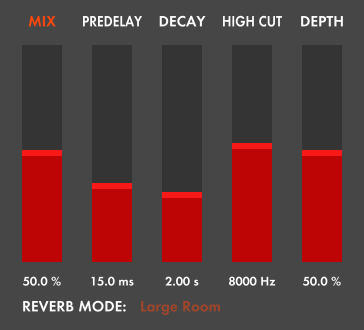
The ValhallaRoom GUI is divided into several sections. The sliders in the left part of the GUI represent the high level parameters, in that they have the most dramatic and immediate effects on the sound.

From left to right, the parameters are:

  • MIX: The mix slider controls the balance of the dry input signal to the “wet” reverberated signal, expressed as a percentage. 0% represents a fully dry signal, 100% is fully wet. The Mix slider uses a sine/cosine crossfade, such that the signal is balanced in volume at all settings of Mix.
  • PREDELAY: The standard predelay control, which delays the onset of the Early and Late reverberation. The delay time is expressed in milliseconds. Predelay is useful in establishing the “size” of the room, in that the first reflections won’t be heard until after the predelay time. It can be viewed as moving the “walls” of the space in and out. From a non-physical perspective, the Predelay control is used to add some “space” between the input signal and the onset of the reverb decay, which can add clarity to the source signal. In the olden days, tape echos were used to add 15 to 30 milliseconds of predelay to the input of a reverberation chamber or plate.
  • DECAY: The high level decay control for the Late reverberation. The Decay control could also be labeled “RT60” which stands for the time (T) needed for the reverb (R) to decay to a level 1/1oooth of the initial level (-60 dB). The decay time is based on the mid frequencies – the Bass Mult and High Mult controls in the Late section are used to dial in the decay times at low and high frequencies, which will be explained in more detail later.
  • HIGH CUT: Controls the cutoff frequency of a -12dB/oct lowpass filter, with the units measured in Hertz. The relatively steep slope of this filter creates a more “natural” sound in the high frequencies, which reflects the air and wall absorption found in real acoustic spaces. Setting this to a range between 3000 and 7500 Hz is optimal for most larger rooms, while higher settings of High Cut are useful for emulating chambers and plates, as well as the brighter sounds of many digital reverberators.
  • DEPTH: Controls the balance between the Early and Late reverb sections, measured as a percentage. 0% represents a signal that is only from the Early Reverb, while 100% represents a signal that is all Late reverb. The Depth control uses a sine/cosine crossfade. In addition, a great deal of effort went into “normalizing” the levels of the Early and Late reverb sections, such that the output levels are balanced over virtually the whole Decay range. This control was called “Depth” as a tribute to some of the classic digital reverberators such as the Lexicon 224 and Eventide SP2016, which featured Depth controls that adjusted the balance between early and late reverberation. The effect simulates moving a microphone further away from the source, or (more accurately) controlling the mix between close mikes and room mikes. The Depth control could have been called the “Early/Late Mix” control, but I didn’t like how that looked in the UI.

In addition to the high level sliders, the left part of the GUI contains the Reverb Mode selector, which will be the subject of the next blog post.