ValhallaShimmer Tips and Tricks: Using Diffusion instead of predelay

A number of users have asked why there is no pre-delay parameter in ValhallaShimmer. I decided to exclude a predelay parameter, partly due to the desire to keep the UI as simple as possible, but mainly because I feel that the Diffusion parameter can be used to serve a similar function: to create a sense of separation between the source signal and the reverbed signal.

Here’s a quick tutorial in adjusting Diffusion to create the proper separation/blending between dry and wet signals:

  • Create the desired reverb “size” and decay, through the use of ReverbMode, Size, Diffusion, and Feedback, as described in an earlier tips and tricks entry.
  • Gradually back down on the value of Diffusion. Remember that a value of 0.9 and above will result in a fast attack for the reverb envelope, while a Diffusion value of 0.5-0.618 will result in the reverb fading in very slowly. Setting the value somewhere in between will create an attack that isn’t instantaneous, and that will sit behind the dry signal in a way that is similar to how predelay is often used in reverbs.
  • Listen to the decay after adjusting Diffusion. If it is shorter than desired, turn up Feedback to get the desired decay rate. You can also adjust Size, but this will also affect the fade-in rate.

Devo on Fridays

When I was a kid, there was an ABC show called “Fridays.” It was like Saturday Night Live, except not very funny.

Anyway, apparently they had some pretty amazing musical performances on the show. At least by Devo.

Check out the satin jacket of the host. Who is this guy? Was he a cast member, guest host, ?

Here’s another performance. Different day, same satin jacket on the host. Even with the powerdome, he looks about as cool in this ensemble as, well, I would.

ValhallaShimmer Tips and Tricks: Shimmering

ValhallaShimmer was designed to get a variety of big reverb sounds, with the option of adding pitch shifted feedback to the decay. The “Shimmer” in the title refers to the classic shimmer effect, as used by U2, Brian Eno, Daniel Lanois, Coldplay, etc. There are a few presets that ship with ValhallaShimmer which reproduce this effect, but if you want to dial in your own version, here’s some tips:

  • Use the mediumStereo or bigStereo reverb modes for the smoothest shimmer sounds. The mono reverb mode will have a stronger sense of pitch shifting in the feedback signal, while the other modes have a gentler onset of the pitch shifting.
  • Set the Feedback control for the desired amount of pitch shift in the output signal, and then use the Size control to dial in the decay.
  • The Pitch control should be at +12 semitones.
  • Diffusion works best at around 0.9 for reverberant sounds. If you set Diffusion < 0.5, it will sound closer to a pitch shifted echo, which is another cool sound.
  • The different pitch shift modes have different levels of “smoothness”:
    • The single and dual pitch shift modes have more noisiness in their decay. This is better for emulating the orchestral sounds as heard in “Deep Blue Day.”
    • The singleReverse and dualReverse pitch shift modes are much smoother, and are better for organ-esque sounds.
  • colorMode should be set to dark. This produces a natural roll-off of high frequencies, which eliminates almost all of the aliasing noise in the feedback path of the pitch shifter.
  • Set the modDepth control to a fairly low value at first, as the pitch shifting provides its own random modulation to the signal.

ValhallaShimmer Tips and Tricks: Bloom

The Alesis Midiverb II featured a unique reverb algorithm, which Keith Barr labeled “Bloom.” From the Midiverb II manual:

Programs 45 and 49 are extraordinary variations on the reverse reverb theme. They are exclusive Alesis programs that are unobtainable in any affordable signal processors other than MV II. They are named Bloom and have an envelope that rises (blooms) to a rich and highly diffuse reverb with a smooth decay. These are the ultimate for ethereal effects and long, slow introspective musical passages.

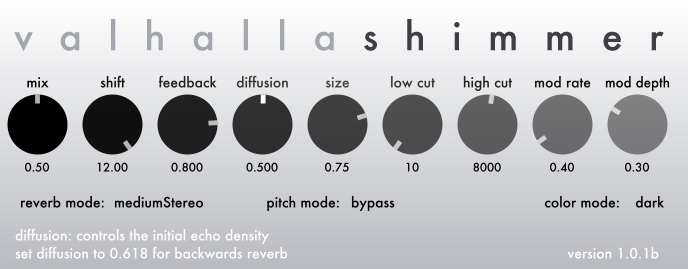
The architecture of ValhallaShimmer lends itself nicely towards emulating the Bloom algorithms of the Midiverb II. A screenshot of the settings:

The key to the emulation is to combine Diffusion of 0.5 with a fairly high feedback setting, and use the reverb mode and size control to tune the attack time of the reverb.

  • In the above example, the mediumStereo mode is being used, as it has a fairly lengthy attack with this diffusion setting. This will sound the closest to the original Midiverb II Bloom algorithms.
  • The bigStereo mode can give you super long attacks, as will the mono mode.
  • The smallStereo mode doesn’t have enough density to get this effect – it will sound like a diffuse echo with a Diffusion setting of 0.5.

The Midiverb II Bloom algorithms didn’t use modulated delays, probably due to cost restrictions of the hardware. Adding modulation to the above settings results in a beautiful, washy soundscape, that works well for ambient synthesizer and guitar.

Keith Barr talked about using allpass coefficients of 0.5 in the original Midiverb (due to this being an easy value to get with bit shifts), and that people complained about the reverb taking too long to build. My guess is that Barr created the Bloom algorithms for the Midiverb II in order to take advantage of this “flaw.” Apparently My Bloody Valentine used the Bloom patches a lot – recent photos of Kevin Shields’ rig show two Midiverb IIs in there.

ValhallaShimmer Tips and Tricks: Adjusting the reverb envelope

In order to dial in the desired reverb characteristics while using ValhallaShimmer, it helps to understand how the Feedback, Diffusion, Size, and Reverb Mode parameters work together:

  • The Feedback parameter controls how much of the output signal is fed back into the inputs. If ValhallaShimmer is viewed as a delay line (and it is far more complicated than that, but with Diffusion at zero this is a fair approximation), the Feedback parameter controls the number of repeating echos before the signal decays to inaudibility.
  • The Feedback parameter also directly affects the perceived intensity of the pitch shifted signal when the Pitch Shift mode is not set to bypass. A higher Feedback setting will result in a more intense pitch shifted sound.
  • The Size control changes the overall delay length(s) in ValhallaShimmer. A larger setting of Size will result in longer delay lines, which results in a longer time for the echos generated by the Feedback parameter to decay away.
  • The Diffusion parameter adds echos to the “delay line” at the heart of ValhallaShimmer. The echos increase with each feedback pass through the network, so combining Feedback with Diffusion results in echos building exponentially in density, until the signal is no longer perceived as discrete echos, but as a reverberant decay. Higher settings of Diffusion result in the echo density building up more quickly with a given Feedback setting.
  • The Diffusion parameter can also add its own reverb decay, even without any Feedback being used. If Diffusion is set around 0.9, the result will be a reverb sound that is considerably longer than the delay length would be without any Diffusion. Applying Feedback to this network will result in a much longer reverb than the same Feedback setting with a lower Diffusion setting.
  • The Reverb Mode parameter has a global effect on the lengths of the delay lines, as well as the density of the echos produced by the Diffusion parameter. The larger the Reverb Mode, the longer the delay lines, and the higher the density for a given setting of Diffusion.

Given that the controls have a fair amount of interaction with each other, there is no one method to get a reverb decay of a given length. The user can decide if it is best to use a larger Size in conjunction with a smaller Feedback setting, or to rely on high Diffusion settings and less Feedback, and so on. ValhallaShimmer is meant to encourage exploration on the part of the user!

An example approach:

  • Start with the Reverb Mode parameter. mediumStereo is best for halls and other “kinda” large spaces. bigStereo and mono are huge, and are a good starting point for very long ambiences. smallStereo is best for short ambiences, spring reverbs, and other sounds that are more metallic.
  • Next, set the Diffusion parameter for the desired attack. Low values will start off as echos that slowly build to reverbs, values around 0.5 to 0.618 will cause the reverb to slowly fade in, and values between 0.8 and 0.91 will have a relatively quick attack.
  • The Size parameter can be used to adjust the precise attack time of the reverb, as well as the amount of “color.”
  • Once the attack time is dialed in with Diffusion and Size, use Feedback to get the desired decay time.
  • After this, adjust the tone controls and modulation controls to taste.

ValhallaShimmer Tips and Tricks: Diffusion

In the next week, I will be posting some Tips and Tricks for ValhallaShimmer, to help users dial in the sounds they want. The Diffusion parameter is a great place to begin, as it is one of the most powerful parameters in ValhallaShimmer.

I’ll start from more of a “meta” perspective, and quote Wikipedia: Diffusion, in acoustics and architectural engineering, is the efficacy by which sound energy is spread evenly in a given environment. In the case of ValhallaShimmer, the environment is the plugin. The Diffusion control allows the user to shape how energy from an input signal leaves the plugin. At low settings of diffusion, all of the energy that enters the plugin leaves it at about the same time (i.e. a single delay line). At higher settings of diffusion, the energy is more spread out over time and frequency, with randomization of phase. This is perceived by the listener as sounding reverberant.

From a less physics oriented perspective, the Diffusion control is used to adjust the degree of echo density in ValhallaShimmer. At its lowest setting, Shimmer acts like a delay line (actually 2 delay lines, one per channel, with slightly different lengths). Turn up the feedback for the stereo modes, and the plugin acts like a ping-pong delay.

Once you turn up Diffusion beyond 0.0, the echo density starts to increase. For settings around 0.2 or lower, the increased echo density is fairly subtle for a single repeat of the delay. If you increase the Feedback setting, the first repeat will sound close to a single echo, but later repeats will sound more and more reverberant.

At Diffusion settings around 0.5, the signal will have a fairly high amount of echo density. However, the energy will still be distributed in such a way that short repeats will still have an audible repeating echo. Setting Diffusion at 0.5, and Feedback at 0.5 or greater, is a great way to get the “Bloom” sound from the Midiverb II.

A Diffusion setting of 0.618 has some very unique characteristics. 0.618 is known as Phi (Φ), or 1/goldenRatio. With diffusion set at 0.618, the attack and decay of the reverb signal have the same lengths. The reverb response looks like a Gaussian, or bell curve. This produces a neat “backwards” reverb sound.

If Diffusion is set to values greater than 0.618, the decay characteristics start becoming closer to an exponential decay. The reverb will still “fade in” to a greater or lesser extent, but the decay will be far longer than the attack. In addition, the decay time itself increases. With a Diffusion setting of 0.8 to 0.91, you can get some very long reverb decays, even with Feedback gains of 0.0. Turn up the Feedback, and the reverb decay time gets closer and closer to infinity.

Diffusion settings above 0.91 start to sound weird. The decay lasts longer and longer, but the reverb itself gets quieter and quieter. The explanation for this is that the Diffusion control doesn’t add any energy to the signal – it just redistributes it. So the super long decays come at the expense of quieter signals, as the reverb is taking the same energy and spreading it too thin. This is why the Feedback control is useful for long signals, as it adds gain to the system.

A few other quirks about the Diffusion control in ValhallaShimmer:

  • For higher levels of Diffusion, the sound can become somewhat more metallic, especially for smaller settings of Size. This is fairly common with reverbs that use diffusor sections as their main building blocks. Modulation is the quickest way of reducing metallic artifacts. Another way of getting a similar reverb time with less metallic coloration is to turn Diffusion down, and Feedback up.
  • Higher settings of Diffusion also increase the perceived chorusing in the algorithm (as will smaller settings of Size with the same modulation speed/width).
  • The Diffusion control is smoothed, in order to avoid clicks when changing the Diffusion amount.

ValhallaShimmer: The Controls

At it’s heart, ValhallaShimmer consists of what I call “diffuse delay lines.” These are actually networks of diffusors, that act like a single delay line when the Diffusion control is turned down to zero, and generate clusters of reflections when the Diffusion control is turned up. By adjusting the Diffusion, Size and Feedback controls, the sound can be changed from short delays, to feedback echos that gradually turn into a gentle wash, to reverbs that decay away over several minutes. Add the pitch shifting, tone controls and modulation into the mix, and a huge variety of soundscapes can be generated.

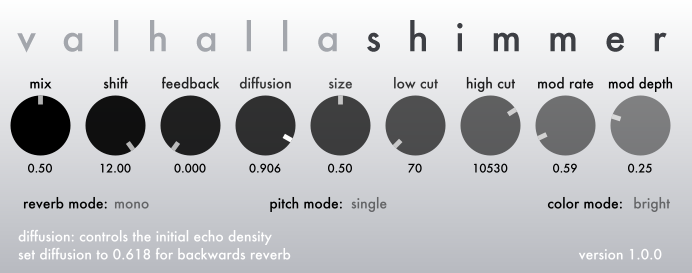
ValhallaShimmer has 9 continuous parameters (“knobs”) to allow for coarse or fine adjustment of the reverb algorithm:

  • Mix – controls the relative balance of the input (“dry”) signal and the reverbed/delayed (“wet”) signal. The Mix control uses a power-complementary crossfade technique, to ensure constant levels throughout the various settings.
  • Pitch – controls the shift amount in the feedback loop, ranging from -12 to +12 semitones. The specific pitch shift characteristics also depend on the Pitch Mode, explaned below.
  • Feedback – adjusts the amount of feedback applied around the diffusor delay / pitch shifter network. Note that the pitch shifting will only be audible with Feedback values greater than zero.
  • Diffusion – controls the coefficients of the individual diffusor delays within the network.  A coefficient of 0.0 corresponds to no diffusion – i.e. a straight delay. A coefficient in the 0.5 to 0.618 range will result in a reverb sound that slowly fades in. A coefficient of 0.9 results in a fairly long decay (depending on the Size setting), even if Feedback is set to zero.
  • Size – controls the delay lengths within the network. A small Size setting corresponds to short delays, which translates to a smaller room sound. A large Size corresponds to long delays, and a bigger room sound. The Size setting also effects the overall decay of the reverb: assuming all settings are the same, a larger setting of Size will correspond to a longer decay.
  • Low Cut – controls the cutoff frequency of a highpass filter in the delay path, with the cutoff specified in Hertz. A higher setting of Low Cut will result in less low frequencies being passed through. The Low Cut filter is in the feedback path, so higher settings of Low Cut will result in the decay becoming brighter and brighter as it decays away.
  • High Cut – controls the cutoff frequency of a lowpass filter in the delay path, with the cutoff specified in Hertz. A higher setting of High Cut will result in less high frequencies being passed through. The High Cut filter is in the feedback path, so higher settings of High Cut will result in the decay becoming darker and darker as it decays away.
  • Mod Rate – adjusts the speed of the modulation, in Hertz. This is only a rough estimate of the actual modulation rate, as there are dozens of random modulators in the reverb algorithms, each with a slightly different base modulation rate.
  • Mod Depth – controls the depth of the modulation. This translates to a constant value in samples, so it needs to be adjusted in conjunction with Mod Rate in order to get the amount of detuning desired.

In addition to the knobs, ValhallaShimmer has 3 mode selectors, which can be found under the knobs. The mode selectors are used to switch between different reverberation algorithms, pitch shifting types, and the overall tone of the plugin.

  • Reverb Mode – selects the base algorithm type that is used. The Reverb Mode has a large impact on the perceived size of the reverb, and also impacts the reverb density, modulation depth, and the rate at which the pitch shifted feedback builds.
    • Mono – selects a mono-in, stereo-out reverberation algorithm. The Mono algorithm has a very large base size, and can take a long period of time to fade in This algorithm has a very high echo density with most settings of the Diffusion parameter.
    • Big Stereo – selects a stereo-in, stereo-out reverberation algorithm with a very large base size. This algorithm is the best for very large acoustic spaces, such as cathedrals and monumental spaces, as well as reverbs that slowly fade in and out. The Big Stereo algorithm has a very high echo density with most settings of the Diffusion parameter.
    • Medium Stereo – selects a stereo-in, stereo-out reverberation algorithm with a smaller base size than the Big Stereo mode. This algorithm, in conjunction with a reasonable amount of feedback, is the best choice for traditional “hall” reverbs. It is also a good choice for pitch shifted feedback with a fairly fast build of harmonics. The echo density is lower than the Mono and Big Stereo algorithms, but is still fairly high.
    • Small Stereo – selects a stereo-in, stereo-out reverb algorithm with a small base size. This algorithm can be useful in achieving small room sizes, chorused short ambiences, and other smaller reverb sounds. It can be more strongly colored than the other reverb modes, and has a noticeably lower echo density than the other modes.
  • Pitch Mode – selects the type of pitch shifting used in the feedback loop of the reverberator:
    • Single – the signal within the feedback loop is shifted upwards or downwards, with the pitch ratio determined by the Shift control. This is the “classic” mode used for recreating the Shimmer sound found in many of the Eno/Lanois productions. The randomization used in the pitch shifting will create noisy sidebands in the feedback loop, which results in a sound that is reminiscent of a large orchestra
    • Dual – the signal within the feedback loop is shifted both upwards and downwards simultaneously, with up/down pitch ratios determined by the Shift control. This is a good setting for getting a rich, symphonic harmonic texture.
    • SingleReverse – the signal within the feedback loop is shifted upwards or downwards, where the signal within each pitch shifted “grain” is reversed in time. This results in a smoother pitch shifting sound than the Single or Dual modes – less orchestral, more organ-like.
    • DualReverse – the signal within the feedback loop is shifted both upwards and downwards simultaneously, where each pitch shifted “grain” is reversed in time. This mode is well suited for producing a pipe organ sound.
    • Bypass – the signal within the feedback loop is not pitch shifted, and is passed straight through without alteration. This is useful in created more conventional reverb sounds, where turning up the Feedback parameter increases the decay time.
  • Color Mode – controls the overall “tone” of the algorithm:
    • Bright – the reverberated signal can be “full-bandwidth,” depending on the setting of the High Cut control. There is no inherent high frequency lost in this algorithm. The resulting sound is more “hi-fi” or modern than the Dark color mode.
    • Dark – the reverberated signal has a large amount of high frequency loss, with the exact amount of high frequency loss varying depending on the Reverb Mode selected. The resulting sound is reminiscent of the classic digital reverbs of the 1970’s and early 1980’s, with steep cutoffs above 10 kHz.

ValhallaShimmer: a bit of history

ValhallaShimmer has its roots in the earliest digital reverberation algorithms, as described by Mannfred Schroeder in 1961. Schroeder, in his earliest AES paper on the subject, described a “colorless” reverberator, based upon cascaded diffusor (allpass) delays. At the time, the computation power available on the mainframe computers Schroeder was using limited the complexity of his algorithms.

In 2006, I experimented with extending Schroeder’s early reverberator structure to much higher orders. I was expecting that using much larger numbers of cascading diffusors would increase the echo density of the algorithm. It did, but it had a really weird effect: As the number of diffusors increased, the reverb decay started to sound less and less like a “real” acoustic space, and more and more like some weird spooky backwards thing.

It turned out that I had run into an artifact of what is known as the Central Limit Theorem. Without getting into the messy scientific details, the effective result was that, as the number N of cascaded diffusors increased, the attack and decay characteristics of the reverb changed from an exponential decay towards a bell, or Gaussian, curve. In other words, the reverb would slowly fade in, and then slowly fade out.

This wasn’t what I was expecting. More importantly, it sounded cool. Add some randomized modulation to each of the diffusors, and the result was an ethereal, ghostly soundscape.

The pitch shifting Eno trick was one that I had first tried back in 2004. The pitch shifter I used at the time produced decent results. Later on, I conducted research into early pitch shifting techniques (as detailed in earlier blog posts) and developed a simple yet effective algorithm for pitch shifting. The goal was to generate similar artifacts to what a “de-glitched” pitch shifter would produce in a feedback loop with a reverberator, but without performing the costly autocorrelation analysis that the deglitching pitch shifters used. The result was a pitch shifting algorithm that added noise and texture to the feedback loop. It was an attempt to avoid metallic colorations (and emulate what a deglitching pitch shifter sounds like when it is freaking out), but it also sounded like a huge orchestra warming up.

When I started work on ValhallaShimmer in the spring of 2010, I knew that I wanted to combine the results of the cascaded diffusor experiments with the pitch shifted feedback as used by Brian Eno, Daniel Lanois, U2 et al. In order to put these into plugin form, I had to perform extensive optimization on the basic building blocks, as my early experiments used up far too much of the CPU. After a few months of work, I had a framework that brought the CPU consumption down by a factor of 10 to 20 from my 2006 experiments.

The original version of ValhallaShimmer had a single reverb algorithm, the one currently labeled as “mono.” Testing the plugin with material recorded with stereo miking techniques quickly pointed out that true stereo algorithms were necessary. The resulting algorithms (bigStereo, mediumStereo, smallStereo) were designed to get different perceived room “sizes,” although most of the sounds fall in the range between pretty big and huge.

During the optimization process, I found that one of my CPU-reducing tricks resulting in a lot of high frequency loss. Instead of looking at this as a technical shortcoming, I listened to the results. The optimized code sounded “warm,” and much closer to an ancient digital reverb with a low sampling rate and steep anti-aliasing filters. So I left it in as the “color” mode, so the user can choose between the original “bright” mode for modern reverb sounds, and the “dark” mode for that warm vintage sound.

Looking back at the history of ValhallaShimmer, it just struck me that most of what makes this an original algorithm was embracing the weird little artifacts that I came across while experimenting with various digital signal processing techniques. The cascaded diffusors didn’t behave in the manner I was expecting, but they sounded great. The pitch shifting artifacts added some grainy texture to the reverb decay, that sounded like a string orchestra section, even though the original goal was to get rid of metallic coloration. My optimization techniques darkened the overall tone, and helped me to realize that dark is often a good thing for a reverb. Happy accidents.
ValhallaShimmer released for Windows RTAS

I just released the Windows RTAS version of ValhallaShimmer. Set your browsers to

http://www.valhalladsp.com/shimmer.html

and check it out. Demo versions available at that link.

To sum up (as there has been several updates in the last few days): ValhallaShimmer is now released for:

OSX VST
OSX Audio Unit (32-bits)
OSX Audio Unit (64-bits)
OSX RTAS

Windows VST (32-bit)
Windows VST (64-bit)
Windows RTAS

I’m going to go out and enjoy the snow with the kids for the rest of the day (it’s snowing here in Seattle, which doesn’t happen in November that much). After that, I will put up a few blog entries about ValhallaShimmer, explaining the history of it, how it works, tips and tricks, that sort of thing. I also have a few generic topics that I want to cover, although coding has taken priority over happy creative thoughts for the past several months.

ValhallaShimmer updated to version 1.0.2. 64 bit AU, 64 bit Win VST available.

I’ve just updated ValhallaShimmer to version 1.0.2. The new features:

  • 64 bit Audio Unit (in addition to the 32 bit AU)
  • 64 bit Windows Vista/7 VST (in addition to the 32 bit VST)
  • Improved saving/recall for OSX DAWs
  • Internal presets now included in the Windows VSTs

Check it out at http://www.valhalladsp.com/shimmer.html

Next up, finishing the Windows RTAS port. After this is done, I hope to get back to blogging every now and then.