Eno/Lanois, U2, and the “shimmer” effect

As a teenager in the 1980’s, I listened to a lot of U2. I loved their early work with Steve Lillywhite, but the albums produced by Brian Eno and Daniel Lanois took U2 into a more ambient direction. One of the most distinctive sounds of the Eno/Lanois collaboration with U2 is a reverb effect with octave swell. You can hear this on the “infinite” guitar in “With or Without You”:

The effect is more prominently featured on the instrumental “4th of July”:

Nowadays, this effect is referred to as the “shimmer” effect. Judging from browsing a bunch of forums, a lot of people have tried to figure out how to get this sound with current gear. Over the next week, I will discuss the shimmer effect in more detail, with some examples of its use pre-U2, and a detailed technical analysis of what is going on inside the effect.

Flashback Caruso

Every time I hear this song, I flash back to 1996, and hanging out with some of my best friends in Portland. This was in my analog days, although it was on one of these Portland visits that I bought “The Computer Music Tutorial” by Curtis Roads, which started me back on the DSP path.

I didn’t know the name of this song until a few weeks ago. It is off of the “Faust Tapes” album, which was one long track on the CD that I have. I think that I got “Krautrocksampler” around this time, and was following up most of the leads from that book.

ValhallaFreqEcho and the 360 Systems Frequency Shifter

I just found an interesting link on the 360 Systems 20/20 Frequency Shifter:

360 Systems 20/20 Frequency Shifter (BODE)

It gives a nice overview of how frequency shifters were used in some classic electronic music.

Interestingly enough, the color scheme of the 360 Systems unit is very close to the ValhallaFreqEcho colors:

This is pure coincidence, as I just found this post on Matrixsynth. The 360 Systems Frequency Shifter is using Futura for its font, which I used for awhile before switching to the grotesk fonts I am currently using.

ValhallaFreqEcho MkI Released: GUI. Tempo Delay. VST/AU/RTAS. Mac/Windows. Free.

I am pleased to announce the MkI release of ValhallaFreqEcho:

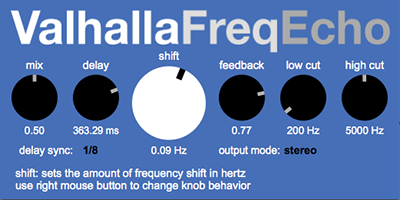
The plugin now features a custom GUI, as seen above. I have added the ability to sync the delay time to tempo. ValhallaFreqEcho MkI is available for Windows and Mac, in VST, AU, and RTAS formats.

ValhallaFreqEcho MkI has been under development for quite some time, and I am rather proud of the results. I invite you to download it and check it out. Keep checking this blog in the next few days for tutorials, tips and tricks, and a bunch of theoretical musings.

We all now have to use the phrase “the award winning plugin, Eos”

I just found out that Eos won a Sonic Joy Award for 2009, from the AudioNewsRoom blog. So, Eos is now “Audio Damage’s award winning plugin, Eos,” or simply “the Award Winning Eos” for short. Take note, and please use some variant of the above in all future references.

On a related note, I am now referring to myself as “The DSP Situation,” in the 3rd person. It’s all about the algorithm abs. Again, please take note of this for all future communications.

Seriously, it feels pretty nice to be involved with the design of an award-winning plugin. I hope 2010 brings more good things like this.

Eos tips and tricks: Recreating the PCM70 Tiled Room

One of the “greatest hits” of artificial reverbs is the Tiled Room preset in the V2 ROM of the Lexicon PCM70. This preset went missing from the V3 software, but you can find a listing of the parameters here.

I was playing with an impulse response of this preset, and decided to emulate it in Eos. Here’s what I came up with:

  • Type: Plate 2. For maximum authenticity, you could use Plate 1, as both Plate 1 and the Rich Chamber algorithm used in the PCM70 Tiled Room preset have a mono input. However, Plate 2 works better with stereo miked material.
  • Pre-Delay Time: 4 msec. This is the same as the original Tiled Room preset. If you wanted to simulate a somewhat bigger space (or the delayed room mikes used by many engineers, such as Steve Albini for The Jesus Lizard’s “Goat”), you could set this between 15 and 30 msec.
  • Size: Try setting this between 10 and 20 meters. The PCM70 preset used 8 meters, but this might have been an attempt to get a more exponential decay out of the Rich Chamber algorithm, which has a fairly “flat” decay compared to most acoustic spaces. The Plate algorithms in Eos will always decay away exponentially, so Size can be used to control the apparent size of the room, as well as the desired coloration.
  • Attack: Set this fairly low.
  • Diffusion: I used 0.5. For drums, you may wish to increase Diffusion, while vocals might require lower settings to avoid metallic coloration. This is true with the Lexicon as well, and seems to have something to do with the pulsetrain waveform of vocals. The Plate algorithms in Eos have a fairly high initial echo density to begin with, even with lower settings of Diffusion.
  • Decay: 0.62. Same as the Lexicon.
  • Low Multipler: 1.258. This results in the same running decay time as the Lexicon
  • Low Crossover (accessible in the automation view in some programs, and the Controls View in Logic): 3410 Hz.
  • High Multipler: 0.25. The Lexicon Rich Chamber algorithm uses a one-pole lowpass filter, as opposed to the 1st order shelf in Eos, so setting the High Multiplier to 0.25 better emulates the steeper rolloff of the Lexicon
  • High Crossover: 9000. This is pretty high, but it emulates the setting in the Tiled Room preset.
  • High Cut: 10000 Hz. I would probably set this lower as needed. The PCM70 has a hard cutoff of 15 kHz, so you may wish to lower the High Cut setting to compensate for this.

The other settings have no corresponding settings in the PCM70, so adjust for taste:

  • Low Cut should be used to eliminate any unwanted “booming” of the bass frequencies.
  • Mod Rate and Mod Depth aren’t relevant to emulating the Tiled Room preset, as the Rich Chamber algorithm in the PCM70 didn’t have modulation – but if you like the sound of modulation, go for it. Smaller Size settings will result in more apparent modulation.
  • The stopped reverb decay will be shorter on the PCM70 than in Eos (or in the PCM70 impulse responses), as the PCM70 has separate decay settings for stopped reverb, so adjust the Eos decay time as needed to strike a good balance between running decay and stopped decay.

DSP Hero: Robert Bristow-Johnson

Super nerdy DSP content warning.

If you program audio DSP effects, you have undoubtedly heard of Robert Bristow-Johnson. If you haven’t heard of him, get yourself a copy of his Audio-EQ Cookbook. This is a succinct little document, that provides coefficient generation formulas for pretty much any second order filter building block you would ever need: lowpass, highpass, allpass, peak EQ, notch, shelving filters, etc. Today, I am implementing these formulas for my own code, but I know I’ve implemented them in at least 3 prior DSP environments. Really good stuff.

A quick Google search doesn’t turn up a ton on Robert Bristow-Johnson (or RBJ, as he is often abbreviated). He worked at Eventide, Fostex, Young Chang (Kurzweil), and Wave Mechanics. RBJ has a few AES papers as well, all of which are worth reading, covering topics ranging from PSOLA pitch shifting (made famous by AutoTune) to filter design to interpolation for oversampling.

If anyone out there knows RBJ, send him my thanks!

A reverb paper of mine just got published online

I wrote a paper with my old coworker and friend Joseph Anderson on reverb architectures for Ambisonics. You can download the paper here.

It was a lot of  fun writing a paper with Dr. Anderson, who is also a master of writing compositions that use Ambisonics to nice effect. Joe (ok, I call him Joe) manages to make Ambisonics work beautifully. One of his compositions uses a salad bowl spinning around a SoundField microphone, which is a very expensive way of getting a simple effect, but the results are stunning when heard in an Ambisonics environment.

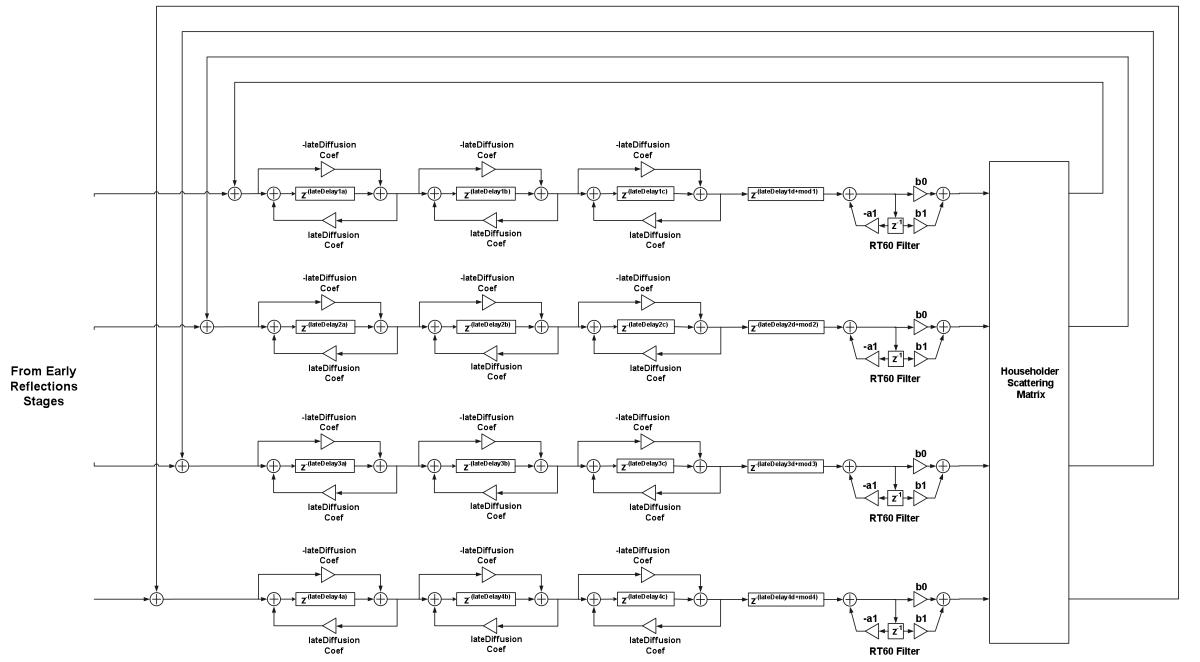
One of my reverb diagrams got mangled when the paper was converted to PDF, so here it is in higher definition (click on the image to see it in more detail):