Valhalla Supermassive: The Controls

ValhallaSupermassive has been designed to get a lot of sonic complexity with a relatively simple set of controls:
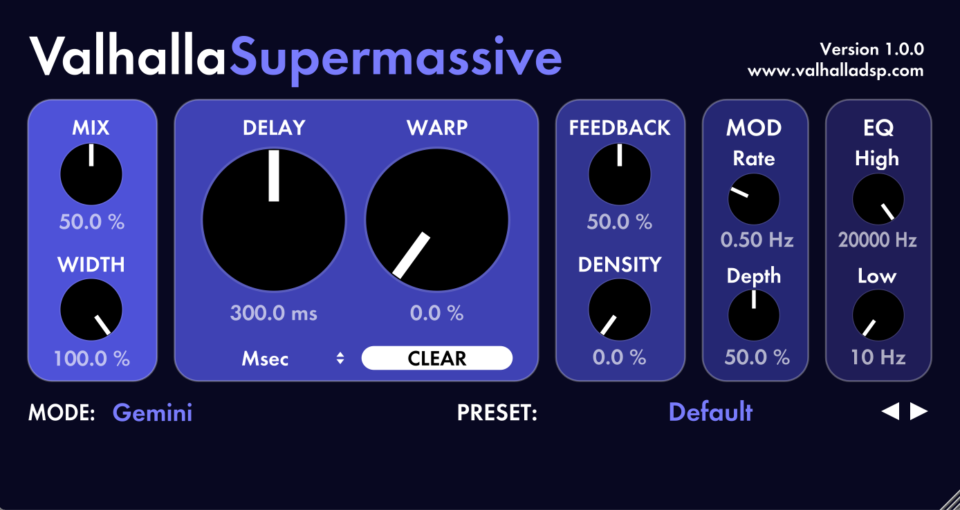
Valhalla Supermassive GUI

MODE:

This combo box selects the mode, or algorithm, being used. This is the most powerful Supermassive control, as the different algorithms have very different attack, sustain, and decay characteristics. For more details, head to the ValhallaSupermassive Modes blog post.

MIX:

Controls the wet/dry mix of Supermassive. 0% is a completely dry signal, 100% is only the reverb/delay signal, and values in between mix in different amounts of the reverb signal.

MIX LOCK:

Click on the MIX label above the control to lock/unlock the MIX control at the last value selected. This is useful when browsing through presets, or for using Supermassive on a send (when you want it set to 100% wet).

WIDTH:

Controls the width of the reverb/delay output of Supermassive. 100% is maximum width, 0% is mono, and values less than 0% will reverse the left and right outputs. Some of the Supermassive sounds will spin around your head from left to right; setting WIDTH to -100% will reverse this direction.

DELAY:

Controls the length of the longest delay line in the feedback delay network, in milliseconds. Depending on the MODE and the WARP setting, you may or may not hear audible echoes at this setting.

DELAY Sync:

This combo box allow you to choose whether the delay is set in milliseconds, or as a factor of the project’s tempo.

  • You can select milliseconds, notes, dotted or triplets. The default is milliseconds.
  • Click the “Msec” text under the Delay knob to bring up the Delay Sync combo box.

WARP:

Affects the lengths of the delays in the feedback delay network, relative to the DELAY setting. This can be used to transform a sound from simple echoes, to resonant echoes and smeared repeats, all the way to lush reverbs.

  • WARP = 0% results in all delays being the length set by the DELAY parameter.
  • With values of WARP greater than zero, the delays in the feedback delay network get more and more spread out (and shorter than the DELAY setting).
  • WARP values between 5 and 15% result in stranger “harmonic delays” where the resonances shift downwards as the sound decays away.
  • WARP settings between 20 and 50% result in “delay clusters” where the initial delay is smeared, and repeats gradually become more reverberant.
  • WARP settings greater than 50% result in more reverberant sounds.

FEEDBACK:

Controls the amount of feedback around the delays in the feedback delay networks. Larger values will result in longer decays. For some of the MODES, the FEEDBACK setting will also affect the initial attack time of the sound (see the Modes blog post for more info).

DENSITY:

Controls the perceived number of echoes in the output.

  • DENSITY works by changing how the various delays are mixed with each other.
  • A DENSITY value of 0% means that the delays are in parallel and/or series, with no further mixing.
  • DENSITY values greater than 0% will increase the mixing between delays, which increases echo density. This will also increase the crossfeed between the left and right delay outputs.
  • At 100% DENSITY, all of the delays are fully mixed. This is recommended for more “conventional” reverbs.

MOD Rate:

Controls the rate of the delay length modulation, in Hertz. This controls a multi-phase sinusoidal oscillator, for lush chorusing and ensemble effects.

MOD Depth:

Controls the depth of the delay rate modulation. The depth also varies as a function of the MOD Rate, so you can have faster modulation without getting “out of tune.” A mod depth of 0% will result in a “drier” sound, and will also make some of the WARP artifacts more audible.

EQ High Cut:

controls the cutoff frequency of a -6 db/oct low pass filter that processes the output of the feedback delay networks. Useful in reducing the amount of high frequencies in the signal.

EQ Low Cut:

controls the cutoff frequency of a -6 db/oct high pass filter that processes the output of the feedback delay networks. Useful in reducing the amount of low frequencies in the signal.

Note that both the EQ filters affect the output only, and are not within the feedback loops of the algorithms.

PRESET:

when the name of the active preset is clicked, the Preset menu comes up. This allows you to select, copy, and save presets.

To access the presets, simply click the name of the active preset, to the right of the PRESET: text in the lower right side of the GUI (the plugin will display “Default” when first opened):

Valhalla Supermassive Preset Menu

The Preset Menu will display when the current preset name is clicked:
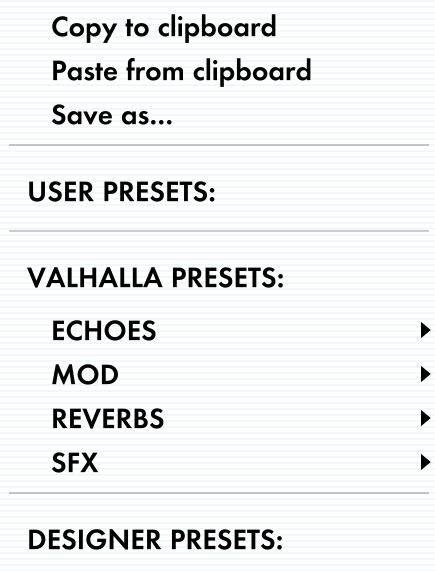
Valhalla Supermassive Preset Menu Detail

To select a preset, simply mouse over the given preset name, and release the mouse button. Mouse over a given preset folder name (the ones with the triangle to the right) to view and select presets within that folder.

To save a preset, simply select “Save as…” from the menu. This will allow you to name your preset, and choose the folder to save the preset to, or to create a new folder for your preset.

If you wish to copy a preset from a forum or blog post, simply select the text with your mouse (including the < and > closing tags), and copy the text (Command+C on Mac, CTRL+C on Windows). Then, select the “Paste from Clipboard” option from the preset menu.

If you want to share a preset with someone, select the “Copy To Clipboard” option, then simply paste the text (Command+V on Mac, CTRL+V on Windows) into the document/email/forum where you want the preset to be.

Tooltips:

The Valhalla plugins are self-documenting. Move your mouse cursor over a control, and the bottom of the GUI will display text describing what that control does.
The Philosophy of ValhallaSupermassive

I started working on reverb algorithm design back in 1998. For the first decade of working on reverbs, I focused on learning various ways of putting together delays, in configurations that fit in the umbrella category of “feedback delay networks.” These algorithms would run digital delay lines in series and/or parallel, in such a way that the echo density would build with time (as found in a real acoustic space). By 2008, I had a huge repertoire of basic reverb topologies.

The next decade (2009-2019) was spent making these topologies sound GOOD. For the most part, “good” was partly shaped by the goals of the product I was working on. The reverb algorithms for ValhallaRoom needed to sound like rooms; the algorithms in ValhallaVintageVerb needed to sound like vintage digital hardware; ValhallaPlate needed to sound like physical plate reverberators. This involved a lot of research into eliminating stray resonances, getting rid of unrealistic high frequencies, shaping the overall frequency response and behavior, and generally “taming” the algorithms into something that sounded natural and would easily fit into a mix.

However, not all of the algorithms that I stumbled across wanted to be tamed. There were some delay configurations that were never going to sound “realistic” or “natural.” I really liked those algorithms, but I had to put them aside, as they weren’t moving towards the goals I was working on at the time. They weren’t behaving.

ValhallaSupermassive is a celebration of those untamed delay algorithms. The ValhallaSupermassive algorithms can be grainy, or overly bright, or metallic, or have weird zapping laser gun resonances, or are just too darned huge to sound like anything natural. They haven’t been polished to sound like the “real world.” They are unrepentantly digital, and unrepentantly un-natural. The Supermassive algorithms just want to be themselves.

Since the ValhallaSupermassive algorithms don’t correspond to “real world” reverb spaces like halls or rooms, they have been given the names of celestial objects. The original goal was to name each algorithm after a supermassive black hole, but most of these are named a word plus a long number. So the Supermassive algorithms are named after constellations, galaxies, that sort of thing.

ValhallaSupermassive also allows these algorithms to move outside the realm of reverberation. The WARP parameter gives the user direct control over the lengths of individual delays in the algorithms. This allows for all sorts of natural and unnatural echoes, sounds that rotate around your head, strange cascading harmonic delays, clusters of reflections, and reverbs that fade in over time, hang in space for an uncomfortably long time, and decay in a strange and unnatural way.

Many of the Valhalla reverbs have a fixed, “natural” echo density that builds with time. ValhallaSupermassive features the DENSITY control, which allows for very sparse decaying echoes, as well as “pointillistic” reverbs that get less dense as they decay away,. These are the sorts of artifacts I have avoided in the past, but ValhallaSupermassive embraces these artifacts as weird and wonderful. Want a smooth reverb? Just turn up DENSITY.

Once I took the pressure off of the algorithms to behave like “normal” or natural reverbs, ValhallaSupermassive came together quickly. The initial prototypes were created as Max4Live patches in late February 2020. I started the “proper” plugin (i.e. C++ code, Juce GUI) in mid-March 2020, and it was essentially done by the end of April 2020.

As always, ValhallaSupermassive was a joint project. Kristin came up with the plugin GUI colors, much of the philosophy behind the plugin, and created the amazing logo, animation, and banner ad for Supermassive. Don Gunn takes credit for the plugin name, voicing decisions, presets, and helped sculpt the overall plugin design. The three of us collaborated on the names of the “celestial objects” used for the algorithm names. We hope you enjoy ValhallaSupermassive. Stay safe, and make some music!

Introducing Valhalla Supermassive

We are happy to announce the latest Valhalla plugin, ValhallaSupermassive!

ValhallaSupermassive is based around feedback delay networks. The individual delays can have up to 2 second of delay time, with user control over the delay lengths, the feedback, how the delays mix with each other, and the modulation rate and depth of the delays. The sonic results range from choruses and flangers, to echoes that fade in and out over time, to massive lush reverbs, and onwards to weird spatial effects that have to be heard to be believed.

ValhallaSupermassive has a bunch of concepts in it that we’ve had in mind over the past decade, that have been looking for a home. Echoes that are too weird for ValhallaDelay, reverbs that are too massive for a general purpose plugin, strange sounds that defy categorization. We are happy to release these sounds into the world!

Oh, and did we mention that ValhallaSupermassive is FREE? Well, it’s FREE!!! No strings attached. Just download, install, and start making music!

Every day is Black Friday here in Valhalla.

It’s that time of year, where people ask us “Do you have sales on Black Friday?” The answer is “Every day is Black Friday here in Valhalla.”  Here’s why:

  • We feel that $50 is a fair price for the plugin. In essence, the plugins are on sale, 24 hours a day, 365 days a year. We don’t play games with the prices.
  • You can feel confident that your Valhalla plugins will retain their value. The Valhalla plugin that you buy for $50 today will be selling for $50 tomorrow, and $50 next week, and $50 next month.
  • Black Friday updates are a Valhalla tradition! During the past 7 years, we have released FREE updates during the week before Black Friday. For Black Friday 2025, we’ve added a new reverb/echo mode (Sirius) to our FREE reverb/delay plugin, ValhallaSupermassive. Our goal is to add to the value of the plugins over time!
  • Audio workers have project schedules that don’t revolve around Black Friday or other sales periods. If you’re working on records or films or post-production or your own music, your projects might need a tool RIGHT NOW, and that RIGHT NOW probably doesn’t hit on Black Friday. The Valhalla plugins will be there, the same price as always, whenever you need to use them for your projects.
  • We enjoy spending time with our loved ones during these holidays, and hope that you can take the time to relax in whatever way suits you during this time. So we don’t want to stress you out with any “BUY NOW!!!” demands. No FOMO here. Feel free to buy the plugins now, or later, or whenever. We’ll be here for you.

Here’s a relaxing video for you to watch. Happy Holidays from Valhalla!

ValhallaDelay Update: Three New Modes and Ducking

We are happy to announce the 1.5.2 update of ValhallaDelay. Let’s jump into the new features!

3 new delay modes:

  • BBDuck: A brighter BBD model, with brightness that tracks the delay time (shorter delays are brighter, while longer delays are darker). Based on our analysis of the Ibanez AD-150 and Roland DC-10. This gets you that “rack mount” BBD sound that customers have been asking for!
  • Clarity: A clean “digital” delay, with a program dependent limiter, so you can SLAM the drive gain without getting distortion. Bandwidth determined by the Age control. Deep and wild modulation waveforms, selected by the Era control. Clarity can be nice and polite, or can get as crazy as you want!
  • DuckTape: A tape delay with built-in companding noise reduction. Similar to the existing Tape mode, but brighter, and virtually noise free. 

All of the new modes have ducking! This is a 1-knob ducking control. We did a lot of work and research to develop a ducking method that didn’t require threshold/attack/release controls. Just turn up the ducking knob, to introduce feedback and output ducking that “just works.”

The new Mac installers are notarized and stapled for Catalina as well, if you are buying a shiny new Mac and need to run Catalina.

Anyway, we are proud of the new ValhallaDelay updates! We’ve added the most requested features from our customers (a tape echo with less noise, a brighter BBD mode, and ducking), and we’ve loved using the new modes and features in our own projects. The 1.5.2 installers are in the user accounts of all ValhallaDelay owners, and we have the new 1.5.2 demos up and running. Thanks for checking this out!


ValhallaVintageVerb 2.0.2: Chaotic Neutral

We’ve updated ValhallaVintageVerb to 2.0.2. The new features in the 2.0.2 update:

  • New reverb mode: Chaotic Neutral
  • VST3 (in addition to VST 2.4, Audio Units, AAX)
  • Fix to the Ambience mode. Some users have reported strange “echoes” when using the Ambience mode in the past. This was due to an uninitialized variable that we tracked down and initialized.

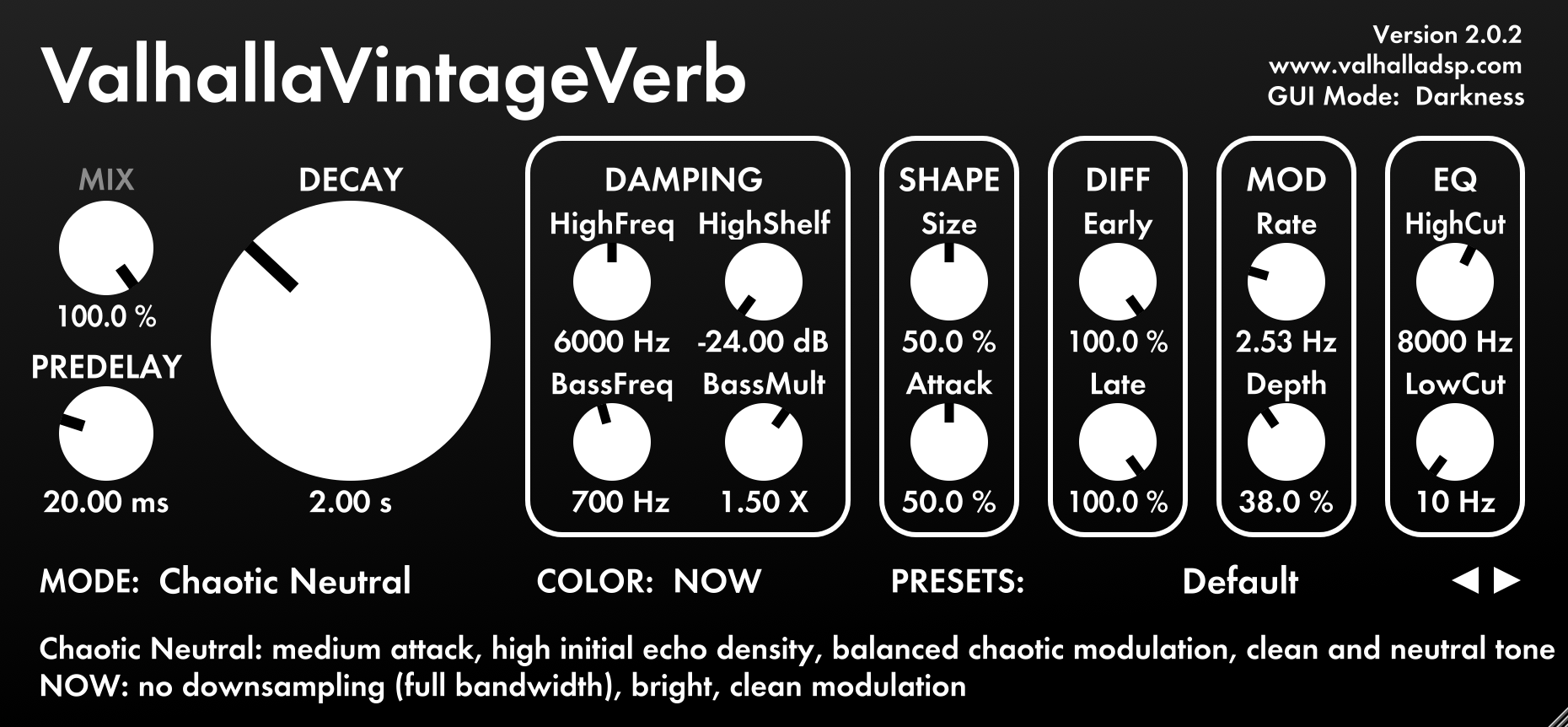
So, let’s circle back to the big news: Chaotic Neutral! As the name suggests, Chaotic Neutral combines chaotic delay modulation (as featured in the Chaotic Hall and Chaotic Chamber modes introduced in the 1.7.1 VintageVerb update) with a more neutral tonality.

The “Chaotic” modulation uses a more complex waveform than heard in many algorithmic reverbs. In Chaotic Neutral, the modulation is applied in such a way that less audible pitch change is heard, even with higher mod rates and depths. The modulation is also distributed in the algorithm in a way that can produce an “icier” sound than the other VintageVerb algorithms, which I personally find really nice sounding.

The “Neutral” in the name is a hint as to the overall tonality. Chaotic Neutral has less metallic resonances than most vintage-style reverb algorithms, and can sound more colorless and open. In a word, neutral. The goal was for Chaotic Neutral to sound like whatever signal you put into it, just sustained in time.

Chaotic Neutral is based on a different type of “classic” reverb topology than the other algorithms in VintageVerb. At large settings of size, the reverb decay may end up sounding longer than what the Decay dial is set to. For smaller rooms and shorter, we suggest setting Size to a lower setting than many of the other VintageVerb algorithms. Chaotic Neutral can sound much less metallic at shorter size settings than many of the older reverb algorithm designs.


ValhallaDelay Updated to 1.1.2. Improved Noise Floor!

ValhallaDelay has been updated to version 1.1.2. The changes since the last “official” 1.0.6 release:

  • Fixed bug where some PT users would experience AAE 9173 error when adding the plugin to a project with the transport running.
  • Lower noise floor with feedback values <100%.

A brief explanation of the noise floor: Valhalla Delay was designed to have analog-style behavior. That means, when the feedback is above 100%, the plugin will eventually self-oscillate. In order to have that self oscillation sound decent, there has to be noise in there. Otherwise, the self oscillation will sound really really BAD. Trust me on this one.

However, I did some thinking on a long walk, and realized that the noise gain could be MUCH lower if the delay isn’t self oscillating. And the self oscillation won’t happen at all with feedback gains under 100%. So I shaped the noise level in the algorithm according to the following graph:

The blue line represents the value of the FEEDBACK slider, from 0% to 200%. The orange line shows the noise gain. At feedback values below 100%, the noise gain is super tiny. For feedback values between 100% and 150%, the noise gain ramps up to meet the previous noise gain values. Above 150%, the noise gain tracks the feedback.

This new noise gain behavior was designed to reduce noise for “delay”-style delays, while keeping self-oscillation behavior the same. So your oscillation presets should sound the same. For non-oscillating presets, we’ve seen an improvement of at least 45 dB in the noise floor. It was a pretty small noise floor before (like, -103 dB at feedback values of 90%), but the noise floor is now essentially inaudible, unless you are monitoring at Saturn V volume levels.

The Age control will still add noise and “noisiness” to the various modes. So keep Age to 0% if low noise is your top priority. And the Tape mode is still noisier than the other modes, as that noise is essential to the texture of the feedback echoes (Don Gunn and I dialed in the Tape mode noise floor from my Roland RE-201 Space Echo). If you want a less noisy tape mode, use HiFi, as HiFi was designed as a cleaner tape echo.

UPDATE, 6/16/2021: Since this blog post was originally written, ValhallaDelay has been updated several times, and is at version 2.1.0 at the time of this writing. We’ve added several new modes, with different amounts of noisiness:

  • The Duck Tape mode is based on a tape delay with companding noice reduction (think RE-501, Korg Stage Echo). The overall tonality and behavior is very similar to the original Tape mode in ValhallaDelay, but with FAR less noise than found in the original Tape mode. So, if you like the sound of the Tape mode, but it is too noisy for you, just switch over to the Duck Tape mode!
  • The LoFi mode is going in the opposite direction. We’ve added some crunchy tape asperity noise, to simulate a well worn cassette tape, or the weird Dictaphone tape cartridge used in the Univox EchoChamper EC-80A tape echo.
  • The Quartz and Clarity modes are both bright and clean digital delays, with very low levels of noise.

So, if you want lower noise, we’ve got ya covered! If you want clean delays, ValhallaDelay now has even more options. Many folks gravitate to a crystal clear sound, free of noise. Me, I find myself thinking of the words of the late Steven Jesse Bernstein: “More Noise Please.”

Anatomy of a Preset: ValhallaDelay’s “Maggot Brain”

As a teenager, I was into delays. It was a simple and cool idea: put a sound in, and it comes out later. My first delay was a Peavey DEP-800, a fairly primitive digital delay. To my untrained ears, it sounded clean. I wasn’t aware of nuances in various delays at the time. They delayed things. That’s all I knew.

Flash forward about 4 years, to when I heard a song that changed my perspective on delays: Funkadelic’s “Maggot Brain.”

The echo in this song wasn’t a simple repeat of a sound. It had weird textures. It would start growing out of control. It was resonant and boomy. It would disintegrate into hiss. It did all sorts of things that the digital delays I had worked with wouldn’t do, but came naturally to tape and magnetic drum delays. It was a musical instrument in and of itself, and it helped make “Maggot Brain” magical.

Skipping to 2019: Don Gunn and I were working on presets for ValhallaDelay. I (once again) went on a rant about how cool the echo is in “Maggot Brain.” So we bought the album (again), put “Maggot Brain” into an editing window, and started measuring things and listening closely.

“Maggot Brain” begins with some sort of microphone pop going through the echo. This is very convenient, as it allowed us to measure the distance between the echo repeats. Don figured out that the echoes were 110 milliseconds apart.

The next thing that was obvious from the impulse response is that there are 3 repeats of equal amplitude. This suggested a multi-head tape or drum echo. The Quad Style in ValhallaDelay was designed for this sort of sound.

We started with the Tape Mode, in Quad Style, and set a delay of 440 milliseconds, and Spacing around 1%. This results in 4 delay taps, spaced (roughly) equally apart.

Listening to the results, Tape Mode just wasn’t bright enough. Switching over to HiFi mode gave us the brightness we were looking for.

Next, we played around with the Tap On/Off buttons. Having the first tap off, and the next 3 on, resulted in the desired repetition pattern.

The echo in “Maggot Brain” has some weird resonances in it. From experience, this sounds like a multi-head echo, where the outputs of all the heads are summed together and used as the feedback signal.


ValhallaDelay: The Diffusion Section

The Diffusion (DIFF) section of ValhallaDelay was designed from the ground up to be as simple to use as possible, while sounding good at all settings. Ideally, I wanted a diffusion network that would allow for slight amount of smearing of delays, all the way up to massive reverbs. The Diffusion went through a lot of iterations over the last 3 years.  Here’s what we landed on:

Diffusion Section:
  • Two controls, Amount and Size. I had originally designed a Diffusion section with 6 controls, but the vast majority of these controls would be useless for (say) 90% of all intended uses.  I decided to “kill my darlings” and limit the controls to the most commonly used controls.
  • No on/off switch. Turning Amount below 1% turns the diffusion off, which results in CPU savings.
  • Hardwired modulation depth. In the past, I’ve had Mod Rate and Mod Depth for diffusion sections. For ValhallaDelay, I wanted something that just “sounds right” at all settings. So I figured out a modulation scheme that results in no net pitch change, and is virtually inaudible at low Diffusion Amount settings. The modulation depth is also scaled by the diffusion size, with the idea being that a short puff of diffusion for a smeared delay should have less modulation than a longer diffusion network used for reverb.
  • DENSE diffusion. A diffusion network uses a bunch of cascaded allpasses. I was originally going to allow for selectable orders for this network, but the higher order network always sounded better to my ears.
  • HUGE size. The diffusion network can span 20 seconds of delay space, without sounding sparse or grainy. This allows for massive reverb sounds.
A deeper dive into the diffusion controls:
  • Amount: Controls the coefficients of the diffusors. The larger the coefficient, the longer the decay of the diffusors, and the shorter the attack. A few good starting points:
    • 0% is OFF (the diffusion section is bypassed)
    • 68%: the diffusion attack is the exact length as the decay. Nice for reverbs that fade in and out.
    • 91%: A good setting for a “pure diffusion” reverb that doesn’t rely on FEEDBACK for its decay.
  • Size: Controls the length of the diffusion network, as a percentage of the delay length for each channel.
    • 0% is the shortest
    • 100% is the longest, and corresponds to the diffusion network being the exact length of the displayed delay
    • In almost all modes, the diffusion length and “straight” delay length will add up to 100% of the displayed delay. So, as the diffusion gets longer, the “straight” delay gets shorter. This allows for the diffusion size to be adjusted without affecting the overall delay.
    • RevPitch is the exception to the above rule. The diffusion is added onto the base delay. This is necessary, as the RevPitch delay is constantly changing from the displayed delay to the shortest delay as the signal is reversed.

Most of the Valhalla Delay modes have “standard” diffusion, where all frequencies have the same amount of phase delay applied. The Ghost mode has a unique diffusion in the Present and Future ERA settings, where higher frequencies have less phase delay applied. The results of this are really weird, with the sounds ranging from ghostly voices from parallel planes, up to bouncing ball delay effects when the Diff Size is high and long delays are used. We’re really proud of the diffusion in the Ghost mode, and I’m really proud of Don Gunn for naming this mode!!!

ValhallaDelay: The MODE Control

The MODE Control in ValhallaDelay is a high level control, that allows you to switch between different echo and delay algorithms.

Click on the MODE control in the lower left corner, to select the active algorithm:

Selecting a new MODE can change the controls visible on the screen. Only the parameters that are active in a given MODE will be visible in the GUI.

There are 7 different MODES in ValhallaDelay:

Tape: A detailed model of a tape delay with variable motor speed, based upon the RE-201 and RE-301.

  • The wow/flutter rate, wow/flutter depth, and overall equalization of the delay are a function of the delay time, as found in physical tape delays.
  • The MOD Wow and Flutter controls act as scales on the wow and flutter depths, in order to dial in the amount of “wear” on the tape.
  • Age controls the amount of asperity noise, as well as the depth of the tape splice artifacts.
  • ERA switches between different modeled tape echoes. The Past and Present models are darker and dirtier, with more of a pronounced high frequency oscillation for short delay times. The Future model is somewhat more “refined.”

HiFi: Another tape model, but with more control over mod rate / mod depth / EQ.

  • The idea is that this is a “higher fidelity” tape echo, similar to that rigged up with reel-to-reel decks in a studio.
  • The MOD Rate / Depth control the rate and depth of a random wow & flutter modulator. These rates are not a function of the delay setting, as they are in the Tape mode.
  • Age controls asperity noise. No splicing artifacts in the HiFi mode.

BBD: A model of a bucket brigade delay, complete with compander artifacts, BBD noise, and a limited high frequency response. This is a dark and dirty delay model.

  • MOD Rate/Depth control a smoothed triangle LFO, for adding subtle vibrato or pitch slews to the signal.
  • Age controls the amount of the noise in the BBD. This will vary according to signal level, due to the action of the compander.
  • Higher settings of Drive will create a “ducking” sound, as the compander kicks in.
  • ERA switches between darker BBD models, and a somewhat brighter Future model.

Digital: Based upon 1980s delay units, that used “floating point convertors” for a sound that had a bit of grit and a smooth delay.

  • MOD Rate/Depth control a smoothed triangle LFO, for adding subtle vibrato or pitch slews to the signal.
  • Age controls the bit resolution of the model, with higher values of Age corresponding to lower bit depths. 50% corresponds to a 12-bit delay.
  • ERA switches between different frequency responses and saturation types.

Ghost: Combines an analog-style delay with frequency shifting.

  • FREQ Shift controls the overall frequency shift of the signal, in hertz.
  • FREQ Detune creates a slight offset between the frequency shifts in the left and right channels.
  • ERA switches in different types of diffusion.
    • Past is the standard diffusion, heard in the rest of the plugin.
    • Present adds some “frequency dependence” to the diffusion, so that some frequencies are heard before others.
    • Future has far more frequency dependent diffusion. Perfect for ghostly voices from the beyond.

Pitch: A digital-modeled delay, with built in pitch shifting.

  • PITCH Shift controls the overall pitch shifting of the signal, in semitones.
  • PITCH Detune allows the left and right channels to be detuned from each other, in cents. Perfect for micropitch and doubling.
  • ERA switches in different types of filtering and saturation.

RevPitch: A delay that reverses and pitch shifts the input signal. The DELAY parameters control the “splice size” of the output signal.

  • PITCH Shift controls the overall pitch shifting of the signal, in semitones.
  • PITCH Detune allows the left and right channels to be detuned from each other, in cents. Perfect for micropitch and doubling.