After lots of experiments with different solutions, we finally have a merch shop we can stand behind. Check it out here: https://valhalladspmerch.com/
For this first run, we’re starting with silkscreened t-shirts and sweatshirts with the Valhalla logo, Vintage Verb, Freq Echo and Space Mod logo t-shirts, and an embroidered baseball hat. All of our t-shirts and sweatshirts are silkscreened by hand, so they will hold up after repeated washings. We LOVE the fabric and feel of this gear!
As this is our first foray into the physical world, we’d love your feedback on selection, quality and fulfillment experience. After your merch arrives, please let us know what you think here: https://www.surveymonkey.com/r/ValhallaMerch.
Also, please note, we’re not set up for international shipping yet, so Valhalla merch is only available for people with a US address at this time. But let us know if you’re interested and outside the US, and we can figure something out.
And as always, thank you for your continued support!
We are happy to announce the release of ValhallaSupermassive 3.0.0, featuring two new reverb/delay modes, Leo And Virgo. These modes share neighboring Zodiac symbols, but that’s about all they have in common. Leo is the biggest, lushest, densest mode in Supermassive, while Virgo is the smallest, grainiest, most spare reverb mode in the plugin.
Leo: The Most Massive Reverb In Supermassive
The new Leo mode is the most super massive-est of all the Supermassive modes. It has a very slow attack, a long to VERY long decay that is controlled by both Density and Feedback, and a high echo density, with balanced modulation. Leo interleaves the high and low EQ filters throughout the reverb network, which means that the reverb decay can be dark, shrill, bass heavy, whisper light, or just perfectly balanced. I find Leo is ideal for big synthesizer sounds, as well as realistic cathedral sounds and other long reverbs.
Virgo: Sparse Reverb, or Complex Delay?
Virgo is the smallest and sparsest mode in Supermassive. It has a fast attack, and basically sounds and behaves like a stereo delay until the Density control is turned up. With higher Density settings, it still sounds like a grainy delay, that kinda sorta turns into a reverb. Virgo is great for pointillistic echoes, spring-ish reverb sounds, and other sparse effects that create more space around your sounds.. While Leo produces a lush wash of sound, Virgo allows you to hear the space between the echos.
Plenty O’Presets
The LATE 2023 preset folder is chock full of presets that show off the Leo and Virgo modes. We highly recommend using these presets as the jumping point for your own explorations.
Supermassive Keeps Getting Better And Better
ValhallaSupermassive was launched in May 2020, and was originally intended as a home for reverb algorithms that didn’t fit into the standard categories. Supermassive 1.0.0 had 8 reverb/delay modes, and every update has added a few more modes. Version 3.0.0 has twenty unique modes, covering a huge variety of reverbs, echoes, and just weird effects.
The last few updates of Supermassive have seen the introduction of increasingly musical algorithms. As I’ve spent more time with the “weirdo” algorithms of the first few Supermassive revisions, I’ve learned how to tame them: adding more filtering, increasing the baseline echo density, balancing the modulation, creating a more open sound. The last two revisions introduced my favorite Supermassive algorithms: Aquarius and Pisces for “echoverbs,” and Scorpio and Libra for multipurpose “generalist” reverbs that sound good on everything. The new Leo and Virgo modes in Supermassive 3.0.0 carry on with the improvements of the last few revisions, and extend them to huge and tiny reverbs.
I’ve loved working on Supermassive over the past few years. Since Supermassive is a free plugin, I don’t feel the pressure to make things perfect that I do with the paid plugins. With less pressure, I’m able to experiment with new things, and try out ideas that might be too weird otherwise. All that being said, the last few rounds of Supermassive research have resulted in algorithms that refine some of the original concepts, and just make them better.
Supermassive 3.0.0: It’s FREE!
As always, Valhalla Supermassive is a FREE plugin, available for both Windows and Intel/ARM Macs. Just head on over to the Supermassive page, or go over to our new Demos & Downloads page and grab all of our free plugins, as well as demos for the commercial ones.
We hope you enjoy the ValhallaSupermassive 3.0.0 update and thanks for your support!
We have just released the 2.0.0 update to ValhallaRoom. The big new features of this update: Two new controls, Space and Lo Cut!
Space: Make Your Reverb Spacier
The Space control controls the amount of feedback around the predelay and early reflections. By turning up the Space control, you can dial in diffuse and modulated echoes, early reflections with a more realistic short decay, metallic early resonances, realistic small spaces, and lush modulated reverbs that are markedly different than what ValhallaRoom could do in the past.
The Space parameter can be found under the Early tab.
With the default Space setting of 0%, there is no feedback, and the plugin behaves as it always used to.
As the Space parameter is turned up, higher amounts of the output of the early reflections are routed back into the input of the predelays.
Space starts to really become audible at 25% or so; 50% results in a shorter exponential decay relative to the Early Size; and values greater than 60% turn the early reflections into a reverb in their own right.
Turning up the Early Size will increase the overall decay at a given Space setting. In general, you will want an Early Size of 200 msec or more for “early reflection reverbs.”
Longer Predelay lengths will produce repeating echoes as Space is turned up.
The relative lengths between the Predelay and Early Size make a huge impact on the sound. By adjusting the length ratios, you can get barely diffuse echoes, very diffuse echoes that turn to reverb after a few repeats, or full-on reverbs. Experimentation encouraged!
The Lo Cut and Hi Cut filters are in the Space feedback path, so you can use these to create echos or reverbs that get duller or brighter over time.
Space values greater than 0% will result in the Space decay feeding into the late reverb, as the predelay for the late reverb is in the feedback path.
The 2.0.0 Room update ships with a bunch of Space presets to help get you started on your curiosity voyage, as well as a preset (SpaceScratchpad) that is a great starting point for learning how the Space control works.
Lo Cut: Get Those Pesky Low Frequencies Outta There
The Low Cut control (abbreviated as Lo Cut in the GUI) can be used to cut out some of the low frequency content in the reverb output. This will result in a less bass-heavy sound, that can be easier to integrate into a modern mix.
The Lo Cut slider can be found on the left side of the GUI, next to the Hi Cut slider.
When the Lo Cut slider is set to 0 Hz, it is effectively out of the circuit, and the sound is identical to previous versions of ValhallaRoom.
As the Lo Cut frequency is increased, the low frequencies will gradually be reduced in the output signal.
From a technical perspective, the Lo Cut slider controls a stereo low shelving filter. As the Lo Cut frequency is increased, the cutoff of the filter is raised, and the low shelving gain is reduced from 0 dB. The gain reduction happens very gradually, to ensure the smoothest behavior when adjusting Lo Cut.
Our recommendation is to adjust Lo Cut to taste, to suit the needs of your mix. Classical music will probably work better with Lo Cut set closer to 0 Hz, while vocals often sound clearer with Lo Cut set to a few hundred Hertz.
ValhallaRoom: Making Things Sound Roomier Since 2011
We first released ValhallaRoom in 2011. Since the initial release, we’ve tripled the number of algorithms, added a resizable GUI, created a new Electric Blue GUI color option, added a bunch of new plugin formats (VST3, AAX), ported the code to Apple Silicon, and kept the plugin compatible with the latest macOS changes.
We’re excited to expand on the core functionality of ValhallaRoom with the new Space and Lo Cut controls. Backwards compatibility is a huge deal for us at Valhalla, so we have implemented the new parameters in such a way as to ensure that your old DAW projects that used ValhallaRoom will behave and sound the same after installing the 2.0.0 update.
The 2.0.0 Update is a FREE Update For All ValhallaRoom Owners
If you already own ValhallaRoom the update is in your user account, so log in and grab the latest installer. If you don’t own Valhalla Room, feel free to grab the demo from the Demo and Downloads page, and check out the new Space and Lo Cut controls. We hope you enjoy the ValhallaRoom update!
It’s that time of year, when the rain returns, the leaves start to turn color, and Apple releases a new operating system. We’ve been testing the Valhalla plugins with the macOS Sonoma betas and release candidate for the past few weeks, and are happy to announce that all of the Valhalla plugins install, authorize and run in Sonoma with no issues!
One of the main features of the Valhalla plugins is the MODE control. The Mode control is located in the lower left corner of the GUI, and will bring up a popup menu when clicked, with a list of the available modes. Each “mode” is a distinct algorithm, with different sonic characteristics. In many ways, the Mode control is the highest level control in the Valhalla plugins, as it allows for a quick switch between diverse sounding & behaving algorithms.
Valhalla VintageVerb currently has 20 unique reverb modes. The plugin originally launched with 8 modes in December 2012, and has been updated with new modes when inspiration strikes (for me, that is, as the algorithm developer). A quick list:
Concert Hall. Based on the hall algorithms of the late 1970s and early 1980s. Huge spatial image, echo density that can be adjusted from very sparse to very dense, and lush chorusing modulation.
Bright Hall. Similar to the Concert Hall algorithm, but with a brighter initial sound, and deeper and lusher modulation.
Plate. Inspired by early 1980s plate algorithms. Highly diffuse, bright initial sound, high echo density, lush chorused modulation.
Room. Emulates the sound of early 1980s room algorithms. Medium diffusion/early echo density, somewhat darker sound, chorused modulation.
Chamber. A transparent and dense algorithm. Highly diffuse, high echo density, less coloration than Plate/Room algorithms, chorused modulation.
Random Space. This generates DEEP and WIDE reverbs, with a slow attack, and more diffusion than the late 1980s algorithms that inspired it. The modulation uses internal delay randomization, to reduce metallic artifacts without the pitch change that can occur in the algorithms with chorused modulation.
Chorus Space. Same as Random Space, but with the delay randomization replaced with lush chorused modulation.
Ambience. Combines time varying randomized early reflections with a full-featured reverb tail, with the balance between early and late reverb controlled by the Attack knob. Useful for adding “air” to drums, vocals, and any place where a reverb should be felt but not heard.
Sanctuary (added 2013). Inspired by a classic German digital reverberator from the 1970s. Discrete early reflections, a dense late reverb that rapidly builds in echo density, lush detuned modulation. Sanctuary incorporates the bit reduction and floating-point gain control used in the A/D and D/A convertors of the early digital hardware.
Dirty Hall (added in 2014). A fresh look at the Concert Hall algorithm, with the goal being to emulate the strange fixed point and convertor artifacts of early 80s reverb hardware. Lusher and denser than the Concert Hall algorithm, with loads of warmth and grit on tap, for a roughly hewn beauty. Plug in your analog synth and send yourself into retro sci-fi heaven.
Dirty Plate (added in 2014). All the warm and gritty artifacts of Dirty Hall, applied to an old-school digital plate algorithm. High echo density, wide stereo image, and just the right amount of metallic sheen. Drums come alive when sent through Dirty Plate.
Smooth Plate (added in 2014). The complete opposite of Dirty Plate. Smooth decay at all settings, from short to near-eternal. Lush chorusing, with none of the metal found in Dirty Plate. The most transparent and naturalistic reverb in ValhallaVintageVerb. Crank up the Size parameter, and float off into space!
Smooth Room (added in 2014). A smooth and transparent room reverb, in the Smooth Plate style. Useful for emulating the Room/Hall algorithms of late 1980s hardware, as well as getting clear reverberation with low amounts of coloration.
Smooth Random (added in 2014). A random room/hall algorithm, with transparent decays that can be adjusted from tiny to huge. Randomized delay modulation, similar to Random Space, but with a much tighter initial attack and smoother decay. A good “jack of all trades” reverb algorithm.
Nonlin (added 2014). Gated, reverse, and nonlinear reverbs are all on tap here. Use Size to control the duration of the reverb, and Attack to smoothly interpolate between a truncated reverb, a “flat” gated decay, and huge reverse reverbs. Lush chorusing modulation on tap, for your shoegazing needs.
Chaotic Hall (added in 2017). A chaotic take on the Concert Hall algorithm, with modulation and saturation artifacts inspired by classic tape echoes. Lush and warm, with subtle wow and flutter chorusing that adds depth without making your reverb seasick.
Chaotic Chamber (added 2017) Smooth and chaotic at the same time. A relatively “dimensionless” reverb algorithm, that adds depth to your sound. Wow and flutter modulation, subtle tape saturation. Use this algorithm on pretty much any input, and it will sound good.
Chaotic Neutral(added 2019). Combines chaotic modulation with a fairly “colorless” algorithm architecture, for a reverb that sounds like the input – just with reverb!
Cathedral(added 2021). An updated version of an FV-1 algorithm created by Sean Costello in 2014, Cathedral is BIG yet clear, for long, open reverb decays with ensemble modulation and a realistic rolloff of high frequencies.
Palace (added 2023). Loosely inspired by a classic “room simulator” algorithm from the 1980s, but updated to allow higher echo density and lush modulation. Palace is perfect for room reverbs of all sizes, ranging from small drum rooms through concert halls and all the way up to giant cathedrals. The Palace algorithm sounds more realistic and open than the other room algorithms in VintageVerb, while still retaining old school digital charm.
People have asked what the best reverb modes are to use for a particular situation. While we’re fond of all the VVV modes, here’s a few starting points:
The Dirty modes (Dirty Hall / Dirty Plate) are the ones that are most faithful to late 70s / early 80s digital hardware reverbs. When designing these modes, Don Gunn and I spent a lot of time listening to and emulating the artifacts of a Lexicon 224XL and AMS RMX-16: floating point convertor quantization, steep lowpass antialiasing filters, fixed point quantization of the audio signal, and fixed point quantization of the modulation signals (the 224XL sounds like an old modem with high amounts of modulation). The Dirty modes are the best reverb modes for adding depth and character to synthesizer sounds.
The Smooth modes are a modern update of the “classic” Lexicon reverb algorithms. A great deal of attention was spent on having realistic & unobtrusive filtering, as well as shaping the reverb output taps for a natural exponential decay. The Smooth modes are the best reverb algorithms for “expensive” sounding vocals and realistic rooms.
The Chaotic modes were an offshoot of the work I was doing on the tape modes in ValhallaDelay, and feature “chaotic” modulation waveforms that are close to the wow and flutter found in worn-out tape loops. The saturation in these modes is based on the complex pre-emphasis / nonlinearity / de-emphasis that is heard in tape decks. I feel that the Chaotic modes are the best reverb algorithms for longer synth verbs that still sit well in the mix.
The new Palace mode is a great choice for any situation where you want to add “room” sound. Use a small Size setting in the Palace mode for drums, or use a huge Size for big vocal and synth reverbs.
December 2022 marked the 10th anniversary of the launch of our most popular plugin, ValhallaVintageVerb. To celebrate the occasion, we are happy to introduce the latest reverb mode in VintageVerb: Palace!
Palace: A Really Fancy Room
As the name suggests, the Palace reverb mode is essentially a big, fancy room algorithm. The Palace mode can sound more realistic than the other room and chamber algorithms in VintageVerb, while still retaining “vintage digital” characteristics. By adjusting the Size, Attack, Early and Late Diffusion, the Palace algorithm can simulate rooms ranging from small studios and chambers, to concert halls, all the way up to cathedrals and the grandest memorial architecture.
Palace Reverb Mode: Vintage Inspirations, Modern Expansions
The Palace reverb mode is loosely inspired by a digital “room simulator” hardware reverb from the 1980s. We’ve taken a lot of liberties with the algorithm, and added a bunch of things not possible in the original hardware, with higher echo density and lush modulation being some of the highlights. The goal was to retain the “open” realistic reverb decay, while allowing the user to dial in a more modern reverb sound if desired.
Palace Enhanced Parameter Set
VintageVerb has more parameters than your typical early 1980s hardware reverberator, so we have expanded the Palace algorithm to fit the VVV parameter set, while keeping room to dial in the sparser sounds heard in the original:
The Early Diffusion parameter in Palace controls both the level and density of the early reflections in the reverb decay. An Early Diff value of 40% corresponds to the early 80s hardware, while higher values map to the higher echo density of the late 80s revisions.
Late Diffusion allows the Palace algorithm to achieve both higher echo densities than the 80s hardware, as well as reducing the perceived pre-delay. Set Late Diffusion to 0% to obtain that authentic “reflection off the back of the concert hall” sound from the 1980s hardware. Higher Late Diffusion values will smooth things out. I like to keep this at 50% or lower for the smoothest sound with the least coloration.
Attack allows for control over the volume of the early reflections (in combination with the Early Diffusion parameter). In general, keeping Attack at 0% is recommended for emulating the 1980s room simulator. Higher values of Attack will reduce the early reflections volume, which may be useful when Early Diffusion is set to higher values.
The 1980s room simulator hardware didn’t have modulated delays. But Palace does! It turns out that modulating the delays in these types of algorithms results in a lush decay that is perfect for vocals, synths, and all sorts of beautiful ambient sounds! Turn up the Mod Depth to get a balanced chorused modulation. Or, leave Mod Depth at 0% for a realistic large hall / cathedral sound where the echoes tumble after each other and bounce all around the space.
The Size control in Palace is critical for dialing in the ideal space. Smaller Size values can get VERY small, perfect for tight drum rooms. Larger sizes are better for more open vocal reverbs. The largest Size values are perfect for halls and cathedrals.
The COLOR control is perfect for dialing in the era of the original hardware. Setting COLOR to 70s results in an 8 kHz bandwidth, 80s to 15 kHz, and NOW to full bandwidth. The overall tonality is much brighter than most of the other VintageVerb algorithms at the same color settings, in order to match the 80s hardware.
Suggested Uses for the Palace Mode: EVERYTHING
We have found the Palace mode to be useful on just about every sound we can throw at it! Clear sounding vocal reverbs, realistic drum rooms, lush synth verbs, huge realistic halls and cathedrals…Palace has it covered.
Palace Preset Folder: A Perfect Starting Point
We’ve provide a bunch of new presets in the Palace folder that showcase what the Palace reverb mode can do. Feel free to use these as is, or as a starting point for your own sonic explorations! Many of the presets have the date in their name of the hardware they are loosely based on (i.e. 1982, 1987), as well as our own 2022 expansions.
Valhalla VintageVerb: 10 Years Of Updates
When ValhallaVintageVerb was released on December 18th, 2012, it shipped with 8 reverb algorithms. Over the past 10 years, we have constantly updated VintageVerb. We’ve added new plugin formats (AAX, VST3), kept up to date with OS X and macOS changes, and ported the plugin to the new Apple Silicon format. We’ve also added 12 additional reverb algorithms to VintageVerb over the years, with the Cathedral algorithm being added in November 2021. The Palace algorithm continues a tradition of adding value to the Valhalla plugins over time.
Palace Mode is a FREE update for all Valhalla VintageVerb owners!
If you already own ValhallaVintageVerb the update is in your user account, so log in and grab the latest installer. If you don’t own Valhalla VintageVerb, feel free to grab the demo from the Demo and Downloads page, and check out Palace and the other 19 reverb algorithms that are unique to ValhallaVintageVerb. We hope you enjoy the ValhallaVintageVerb update!
We are happy to announce the release of the ValhallaDelay 2.5.0 update. The big news: the introduction of the RichPitch mode!
ValhallaDelay: RichPitch Mode
The RichPitch mode combines a pitch-shifted delay signal with a lush, detuned delay signal. The pitch-shifted and detuned signals share the same overall delay time. The PITCH Shift knob controls the pitch shift in semitones, while the PITCH Detune affects both the pitch-shifted and detuned signals.
The Age control in most other ValhallaDelay modes has been replaced in RichPitch by the PitchMix control. PitchMix, as its name suggests, controls the mix of pitch-shifted and detuned signals. With PitchMix at 0%, only the detuned signal comes through. A PitchMix value of 100% results in only pitch-shifted signals in the output. PitchMix at 50% creates an equal mix of detuned and pitch-shifted signals. You get the idea.
PitchMix: Simple Yet Powerful
It turns out that having a mix between detuned and pitch-shifted signals makes RichPitch a MUCH more powerful mode than the previous pitch-shifting modes in ValhallaDelay. The Pitch, RevPitch and PitchDuck modes always have only the pitch-shifted signal in the output and feedback loop. This can be an awesome sound, but not exactly a subtle sound.
The PitchMix control in RichPitch allows you to dial in delays with subtle harmonic overtones, reverbs with equal amounts of the original signal and pitch-shifted signals, full on crazy pitch-shifting, and everything in between. The PitchMix control is also interactive with the Feedback control. By turning up Feedback and turning down PitchMix, you can create an echo that slowly builds in pitch-shifting intensity over time, while still retaining the original pitch of your input signal.
PitchMix + Diffusion = New Shimmer Reverbs
By turning up the DIFF Amount control in RichPitch, and adjusting the PitchMix control to taste, you can create shimmer reverbs in the RichPitch mode that are different from the other ValhallaDelay modes. These new shimmer reverbs are also very different in nature than ValhallaShimmer, which tends to lean towards “huge and epic” at all times. The RichPitch shimmers can be epic, but can also be subtle or more strident, depending on the PitchMix setting.
High diffusion amounts, plus longer delays, no feedback, and PitchMix set to taste, can be used for purely “feedforward” shimmer sounds. These reverbs have a fixed amount of pitch-shifting compared to the input signal, and the amount of pitch-shifting doesn’t change over the decay time.
Diffusion, shorter delays, higher feedback values, and PitchMix set to taste, can be used for more “classic” shimmer sounds, where you can have as little or as much pitch-shifting as desired. The pitch-shifted signal will continue to build and shift upward as feedback is increased, so a small value of PitchMix can go a long way.
New SHIMMER Presets folder
The ValhallaDelay 2.5.0 installer ships with a folder full of SHIMMER presets, which can serve as a basis for your explorations of RichPitch, or can be used as is. Most of the presets showcase the more subtle side of the RichPitch shimmer reverbs, although “subtle” is probably an inaccurate term for any shimmer reverb!
Hear RichPitch in action
We’ve cooked up a few quick examples, so you can hear what RichPitch is all about.
The first example is a simple repeating sequence from the Moog Grandmother, run through RichPitch set up as a dotted eighth note echo:
At the beginning, PitchMix is set to 0%. As the track progresses, PitchMix is turned up, bringing an octave up signal into the mix. PitchMix is gradually turned up to 100%, and then back down for a more subtle octave overtone. The feedback is turned up near the end of the track, which shows how a subtle amount of PitchMix can be made stronger with feedback.
The second example is based around a Korg MS-20, doing its best imitation of a didgeridoo. First, let’s hear the didgeridoo sound with a convention reverb, using the new Libra mode in ValhallaSupermassive:
Now let’s hear the same track, but with RichPitch being used for a shimmer reverb. Diff Amount is set to a high level, with a fair amount of feedback, and PitchMix at 0%, for a reverb with no pitch-shifting. As the track progresses, I’m turning up PitchMix, to bring an octave up overtone into the sound.
Wanna here more? Download the demo and check it out for yourself!
Updates for Ventura, OS X 10.11 / 10.12, M1 & M2 Macs
We’ve also added some generic “make things better” updates for ValhallaDelay, to enhance compatibility with Ventura as well as a few older macOS versions (more details can be found in this blog post). The ValhallaDelay 2.5.0 installer has now been built for both Intel and Apple Silicon machines (M1 & M2), so no need to install Rosetta 2 to run the installer!
RichPitch Mode is a FREE update for ValhallaDelay Owners!
If you already own ValhallaDelay, the update is in your user account, so log in and grab the latest installer. If you don’t own Valhalla, feel free to grab the demo from the Demo and Downloads page, and check out RichPitch and the other 14 delay algorithms that are unique to ValhallaDelay. We hope you enjoy the ValhallaDelay update, and thanks for your support!
This month marks the 2.5 year anniversary of ValhallaSupermassive. To celebrate the occasion, we’re releasing the 2.5.0 update, with two new reverb / delay Modes: Scorpio and Libra.
ValhallaSupermassive Mode: Scorpio
The Scorpio mode is similar to the Gemini mode in many ways: fast attack, rapid build of echo density, more of a “conventional” reverb. The feedback path in Scorpio is very different than Gemini with lower DENSITY settings, and can sound like a complex ping-pong delay. The Low EQ and High EQ filters in Scorpio are included within the feedback paths, versus outside the feedback path like in the Gemini mode.
These are seemingly subtle changes, but they make a HUGE sonic difference. The complex feedback path in Scorpio creates a lot of stereo width, as well as a more “open” frequency response. By incorporating the High EQ filters into the feedback paths, the Scorpio mode can create far more realistic reverb sounds, where the high frequencies decay away over time. The Low EQ filters can be used to take out a little bit of the low frequencies for a less boomy reverb decay, or can shave off a lot of the low end for a reverb that gets thinner sounding as it decays away.
ValhallaSupermassive Mode: Libra
The Libra mode in ValhallaSupermassive has a somewhat slower attack than Scorpio, and can sound like a delay at 4X the displayed DELAY length when WARP and DENSITY are both at zero. Turn up the WARP control, and Libra quickly transforms into a very lush reverb, with balanced modulation. The DENSITY control will start to bring in shorter recirculating delays, and is very useful in smoothing out the reverb attack and decay. Every delay within the Libra mode is filtered by Low EQ and High EQ filters within the feedback paths.
The upshot of all of the above: the Libra mode is the best mode in ValhallaSupermassive for lush modulated reverbs with a natural decay. The Low EQ is useful for filtering as much low frequency content as you do or don’t need. The High EQ creates organic high frequency damping. The balanced modulation results in smooth sounding chorusing.
Best Uses for Scorpio and Libra: EVERYTHING
There are lots of weird and wonderful echo / reverb modes in ValhallaSupermassive. With Scorpio and Libra, the goal was much simpler: make modes that sound good on everything. The Scorpio mode takes the utility of Gemini, and extends it with precise shaping of the low and high frequencies. The Libra mode extends the high and low frequency shaping into a lusher and denser reverb space. These are perfect reverbs for synths, guitars, vocals, what have you. Scorpio is well suited for shorter / smaller spaces than Libra, due to its inherent shorter initial delay. Libra is a perfect candidate for big halls and ambient music.
Hear the Libra Mode in action
In this track, I’m using the Libra mode for reverb. ValhallaDelay is being used for tape echo and backwards pitch shifting. The mighty Take 5 from Sequential is being used for the synth tracks.
New LATE 2022 Preset folder that features Scorpio and Libra Modes
We’ve included a bunch of presets that use the Scorpio and Libra modes in the LATE 2022 preset folder. You can use them as is, or as a starting point for your own curiosity journey into Supermassive!
ValhallaSupermassive: Now With 18 Original Reverb / Delay Algorithms!
ValhallaSupermassive was originally released on May 19th, 2020, with 8 original echo / reverb modes. Since that time, we have added 10 additional modes, for a total of 18 as of today. We added 4 modes added in 2021 (Cirrus Major, Cirrus Minor, Cassiopeia and Orion) that tended towards the weird and experimental. In contrast, the 4 modes we have added in 2022 (Scorpio and Libra, plus Aquarius and Pisces in May 2022) have extended Supermassive into more practical and eminently useable directions. We feel that these last 4 algorithms stand with any algorithms we’ve released in any Valhalla plugin, free or paid.
How To Get ValhallaSupermassive Scorpio and Libra
As always, ValhallaSupermassive is a FREE plugin, available for both Windows and Intel/ARM Macs. Just head on over to the Supermassive page and follow the links! Or go over to our new Demos & Downloads page and grab all of our free plugins, as well as demos for the commercial ones.
We hope you enjoy the ValhallaSupermassive 2.5.0 update and thanks for your support!
Good news! We’ve just updated all the paid Valhalla plugins for Ventura compatibility. If you are running Ventura, simply log into your user account and download the latest installers. These updates will run on OS X 10.9 through 10.15, as well as Big Sur, Monterey, and Ventura. The free plugins run fine on Ventura as is.
OS X 10.11 / 10.12 Bug Fix
The plugins have also been updated to address a mysterious issue that OS 10.11 / 10.12 users began running into. For some strange reason, plugging an iPhone or iPad into a computer could trigger a system update and crash the DAWs. We figured out this issue was caused by something called MobileDevices.framework. Why would this ever affect plugins, and why would Apple introduce this change without telling anyone? Unclear. Anyway, we’ve rebuilt the plugins to get around this issue.
Updated Installers
We’ve also updated the installers to remove the dependency on Rosetta 2. The plugins have been native M1/M2 since January 2021, and now the installers are native to M1/M2 as well!
Windows users: no changes to the Windows plugins. They just continue to work well with no weirdness.
Valhalla DSP: Keeping A Good Thing Going Since 2010™
Each of the Modes in a Valhalla plugin is a unique algorithm with a discrete configuration of delays, filters, modulators, etc. The Mode parameter is the most powerful parameter in any Valhalla plugin, as it switches between different algorithms with very different sonic characteristics.
Valhalla Plugins are algorithm containers
All the Valhalla plugins are built around a diverse suite of original algorithms. We view our plugins as algorithm containers with empty slots for future updates because I constantly get new mode ideas.
Sometimes these new algorithms are designed to meet a specific need of our customers. Sometimes I create new modes for my own musical projects. And sometimes, I get obsessed with a new idea that won’t leave me alone until I try it out. I’m not saying that adding all these new algorithms is, like, cool, or an indication of a healthy personality. It’s just what happens, and I’ve learned to roll with it.
Adding a new algorithm to an existing plugin “container” is much easier for me than creating a new plugin. Each plugin essentially becomes a theme. The vintage algorithms go in VintageVerb, delays go in ValhallaDelay, the weird ones go in Supermassive, and so on.
This also means our newer plugin containers get updated with fresh new algorithms for years after their initial launch. Since these updates are free for customers, you’re on a mysterious ride with us once you buy a Valhalla plugin. What’s coming next? Who knows!
How many algorithms are in a Valhalla plugin?
I started this practice with ValhallaRoom in 2011 by shipping it with 4 algorithms and 8 empty slots. It was filled up to maximum capacity by 2015. All of our plugins since ValhallaRoom have 24 algorithm slots, as we realized we needed bigger containers.
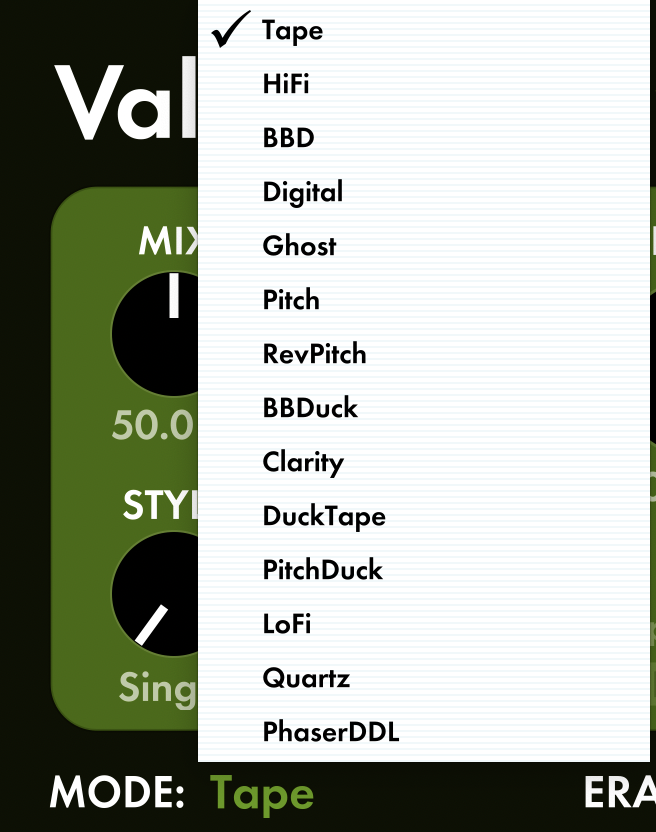
We launched ValhallaDelay with 7 original algorithms in 2019 (Tape, Hi Fidelity, Bucket Brigade, Digital, Ghost, Pitch, and Reverse Pitch.) Over the last three years, I’ve added 7 additional algorithm modes (BBD Duck, Clarity, DuckTape, PitchDuck, LoFi, Quartz, Phaser DDL) as free updates for all ValhallaDelay customers.
ValhallaVintageVerb has a similar trajectory. We launched in 2012 with 8 algorithms and have added 11 additional algorithms to it over the last ten years.
Even our free plugins get new algorithms. ValhallaSupermassivelaunched in 2020 with 8 algorithms, and I’ve added 8 more over the last two years.
For more info, you can check our detailed lists of modes and other features on our product pages.
Why do I need so many algorithms in my plugin?
Switching between different algorithms allows you to get more radical sonic changes than you’ll find from changing the reverb time, scaling the delay lengths, adjusting filter coefficients, or other tweaks.
One algorithm might be more appropriate for a realistic room, while another sounds better for a big synth hall or a “bloom” reverb that fades in over time.
VintageVerb was inspired by the digital reverb hardware of the 70s and 80s. These hardware units offered a wide variety of reverbs: rooms, halls, plates, nonlin, etc. Each of the “old school” algorithms in VintageVerb is best suited for a particular purpose . An expansive hall algorithm doesn’t sound great as a tight drum plate, and just changing the size and decay parameters won’t transform one algorithm into the other. The Mode control can rapidly switch between these different algorithms, so you can dial in your desired reverb quickly.
We find the best way to figure out which mode (or plugin) is best for your project is to play around, experiment, and go with what makes you happiest.
How do I switch between algorithm modes in a Valhalla plugin?
The Mode parameter is usually displayed in the lower left of the GUI:
Click on the name of the active MODE (in this case “Tape”) and it will bring up a list of the available modes for the plugin:
What happens when I switch algorithm Modes?
From a technical perspective, the Mode switch is used to select the render function. We’re not switching around variables within a single code block but calling in a different code block when the Mode is changed. This approach allows me to program more efficiently and hardwire things under the hood.
In some cases, the render function changes not just with the Mode switch, but also with other parameters such as Color, Era, and Style. For example, the Color control in VintageVerb switches between different render functions for the 70s/80s/NOW options.
Valhalla plugin Modes are easy to use!
Do you have to know all this technical stuff to use the Valhalla plugins? Not at all. We aim to streamline the complexity of these algorithms, render functions, and static variables to create plugins that sound great and are easy to use no matter what you do.
Valhalla DSP: We Think About This Stuff All Day So That You Don’t Have To™
We use cookies to ensure that we give you the best experience on our website. If you continue to use this site we will assume that you are alright with it.